Using Quarter Inch · Getting started
Using Quarter Inch on a phone
Quarter Inch works on a phone from start to finish, held upright or on its side. Here’s what’s different on a small screen.
The short answer
Everything works on a phone. The tools are in a sheet at the foot of the screen: tap squares to place a block, and hold your finger on a block for its menu. A phone takes EQ files one by one with Add EQ files, not whole folders.
Everything you can do on a computer you can do on a phone: start a quilt, change it, see its yardage, and cut and print it. Hold the phone upright or on its side. A quilt you start on your phone opens on your iPad or computer exactly as you left it.
Change a quilt on a phone
Open a quilt from your library. The quilt fills the width of the screen, with the tools in a sheet at the foot.
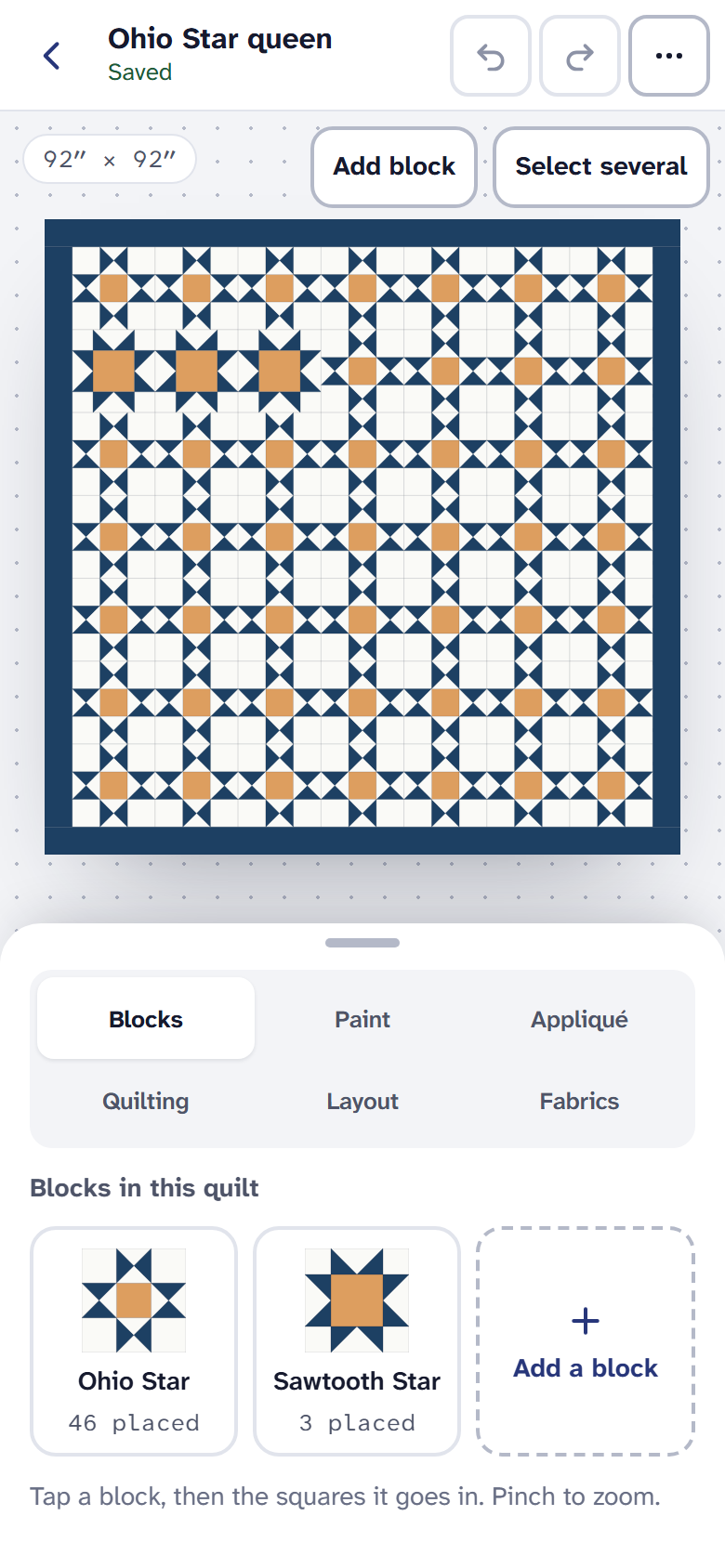
The phone’s editor: drag the sheet up for more room, down for more quilt. Choose a tab in the sheet: Blocks, Paint, Layout, Fabrics and more. Drag the sheet’s handle up or down to give the tools or the quilt more room.
To place a block, choose it under Blocks, then tap the squares where it goes. The quilt zooms so each square is a finger wide.
Hold your finger still on a placed block for half a second to open its menu: turn, flip, replace, or make it plain.
Pinch to zoom and move the quilt with two fingers. The ⋯ button in the bar at the top has History, Cutting and Rename.
Start a quilt on a phone
Choose New quilt. The guided start works the same as on a computer, with the drawing in a strip at the top. Tap it to see Your quilt so far, and Done to go back. See Design your first quilt.
EQ files on a phone
A phone takes EQ files one by one, not a whole folder. In your library, choose Add EQ files at the foot of the screen, then pick the .pj8 or .pj7 files in Files, or open one from an email. For a whole My EQ8 folder, use a computer or iPad.
Cutting and printing
Open Cutting from the ⋯ button. When your PDF is ready, choose Share or print to send it to a printer, or Save to Files to print it later from a computer. The PDF is made on the phone, at true size.
Yardage and the Shopping list are free on a phone too, on every plan.
Everywhere else
- Choose Menu at the top left for Quilts, Blocks, Fabrics, Imports, Recently deleted and your account.
- The magnifying glass at the top searches your quilts.
- On the account page, Delete my account opens a page of its own rather than a box over the screen.
If it doesn’t look right
- A tap opens nothing. On a phone a square’s menu needs a hold, not a tap: keep your finger still for half a second.
- The page moves when you meant to place. Place with one finger. Two fingers move and zoom.
- You can’t choose a folder. A phone picks files, not folders. Choose the files themselves, or import the folder from a computer or iPad.
Checked against the app on
Questions
Short answers.
Something else? A real person replies.
hello@quarterinch.app
Can I design a quilt on my phone?
Yes. You can start a quilt, place blocks, paint, change the layout and fabrics, and undo, all on a phone.
Can I open EQ8 files on a phone?
Yes, one file at a time: choose Add EQ files and pick them in Files, or open one from an email. A whole folder needs a computer or iPad.
Can I print a quilt pattern from my phone?
Yes, with Quilter. Choose Share or print to send the PDF to a printer, or Save to Files to print it later.
Will a quilt I change on my phone show on my iPad?
Yes. Every change is saved to your account and opens on any device exactly as you left it.