Using Quarter Inch · Bringing quilts from EQ
Import your whole My EQ8 folder
You can bring your whole My EQ8 folder across in one go. Quarter Inch finds the projects in it, uploads only those, and reads them while you carry on.
The short answer
Bring your whole My EQ8 folder across in one go, and each quilt appears in your library as it’s read. In your library, choose Import from EQ8, then Choose a folder…, pick My EQ8 and choose Import. Unchanged files are skipped next time.
Import the folder
Sign in, then choose Import from EQ8 at the top of your library.
Choose Choose a folder… and pick your My EQ8 folder: on a Mac it’s in your Home folder, on Windows in Documents. Or drop the folder on the page.
Quarter Inch looks through the folder first, on your computer, and says what it found: how many EQ8 and EQ7 projects are Ready to bring across, which are already in your library, and which are too large for now. Pictures, EQ’s own libraries and anything else that isn’t a project are left alone.
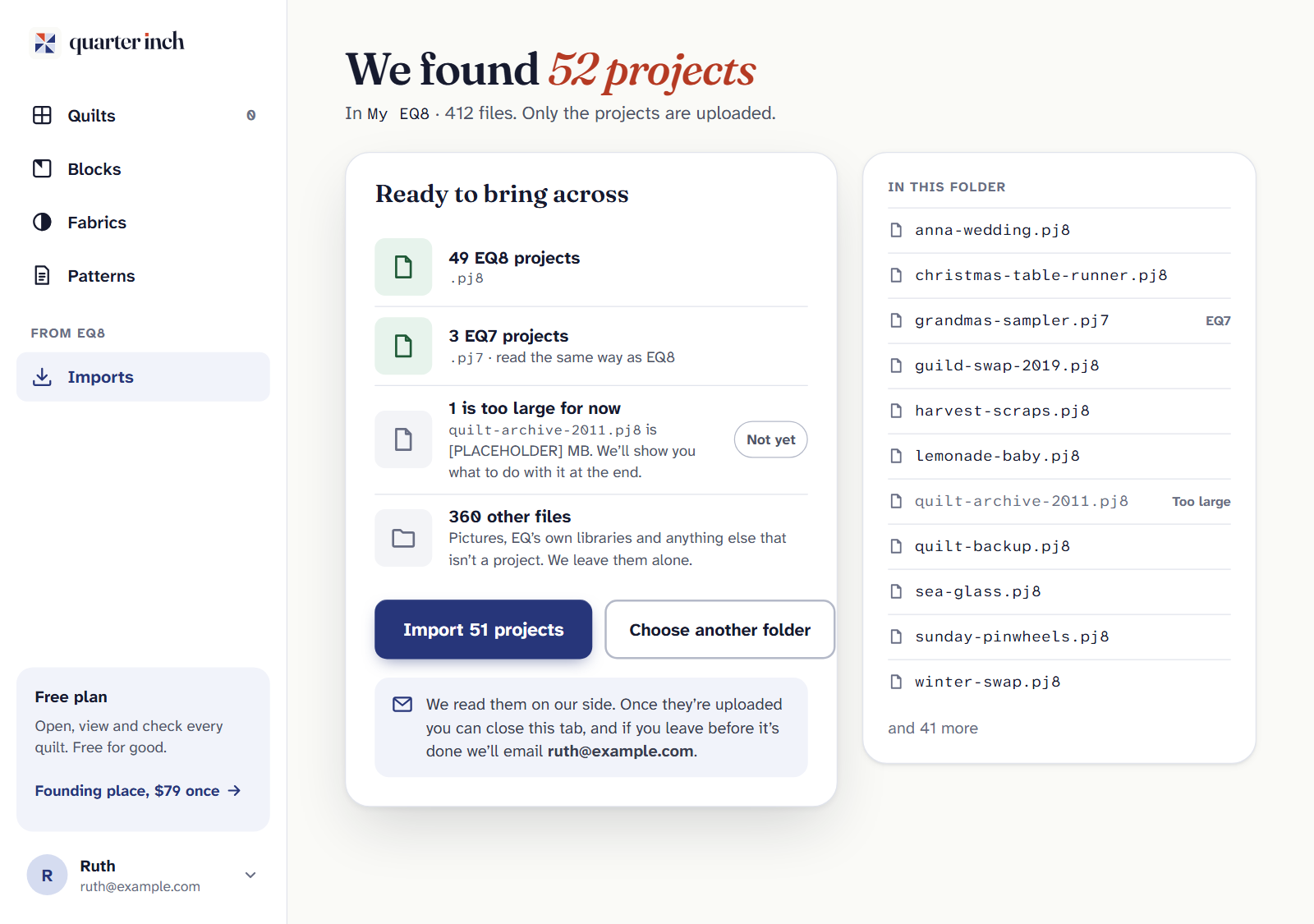
Choose the Import button. It says how many projects it will bring across. Only the projects are uploaded.
Each quilt appears in your library as it’s read. Choose Go to my quilts to keep working while the rest come across.
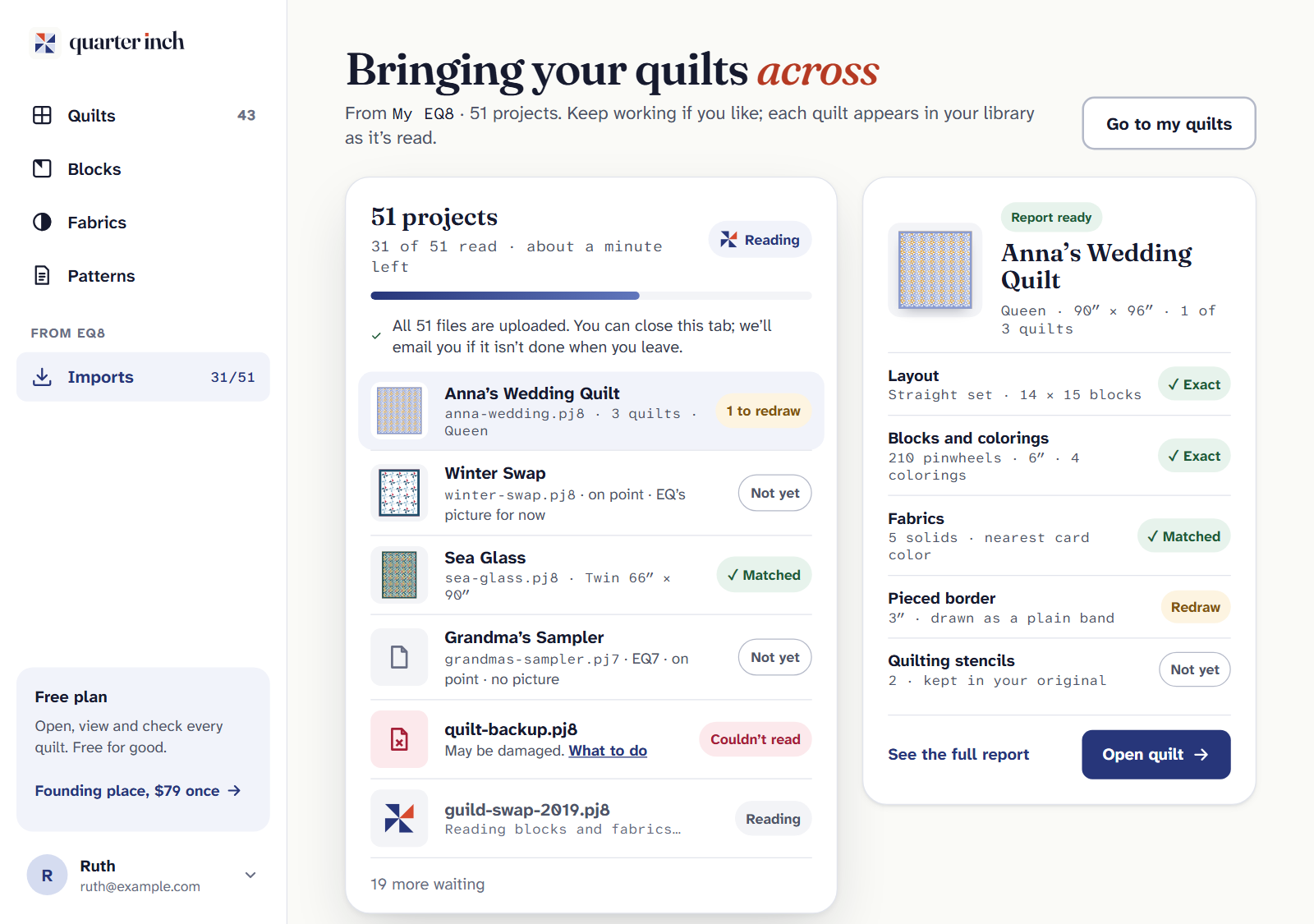
When it’s done, the page says “Your quilts are here”, sums up what came across, and lists any files that need you. Choose See my quilts.
You don’t have to wait
- Keep this tab open until every file is uploaded. The page says when they are.
- After that you can close the tab. The quilts are read on our side and appear in your library.
- If you leave before it’s done, Quarter Inch emails you when it is. Turn that off with Email me when an import or export is ready after I leave on your account page.
- Lost your connection? The import waits, and carries on by itself when you’re back.
Importing again later
Import the same folder again whenever you’ve done more in EQ8. Files that haven’t changed are skipped, so nothing is doubled. A file you changed in EQ since asks you to choose: Replace it or Keep both.
Your past imports are listed under Earlier imports on the import page.
Limits
- Each project can be up to 25 MB. A larger one is listed at the end with Have us move it.
- One import takes up to 1,000 files. The biggest real My EQ8 folder we’ve seen had 252 projects.
Free on every plan. Importing never counts toward the Free plan’s quilts. An EQ quilt counts only once you change it.
If it doesn’t look right
- It found no projects. You may have chosen the wrong folder. Choose Choose another folder and pick My EQ8 itself, or its Projects folder. See Where are my EQ8 files?
- Some files need you. Each says what to do. See If an EQ file won’t open.
- A quilt doesn’t look quite right. Its Import report says what came across.
Checked against the app on
Questions
Short answers.
Something else? A real person replies.
hello@quarterinch.app
Can I import all my EQ8 projects at once?
Yes. Choose your My EQ8 folder and Quarter Inch finds every EQ8 and EQ7 project in it.
Do I have to keep the page open?
Only until the files are uploaded. Then you can close it, and we’ll email you if it isn’t done when you leave.
What if I import the same folder twice?
Files that haven’t changed are skipped. A file you changed in EQ since asks whether to replace it or keep both.
Is there a size limit?
Each project can be up to 25 MB, and one import takes up to 1,000 files. We can move a larger file for you by hand.