Using Quarter Inch · Pattern designer
Add sizes and colorways to a quilt pattern
Every size in a pattern is the quilt itself with whole blocks, worked out exactly. Name the fabrics for your buyers, and add a colorway that prints well in gray.
The short answer
Give a pattern up to five exact sizes, name its fabrics for your buyers, and add a colorway that prints well in gray. In the pattern, Add a size on the Sizes tab adds the next size. Fabric and supplies names each fabric and what to buy, and Colourways › Add a colourway adds one more, checked for black-and-white printing.
Sizes
A pattern can have up to five sizes, from a crib to a king. Each is the same quilt with whole blocks and the same borders, so every one is exact: its yardage, cutting and sewing are worked out for that size, not scaled. The pattern’s tables show the sizes side by side.
Open the pattern and choose Sizes.
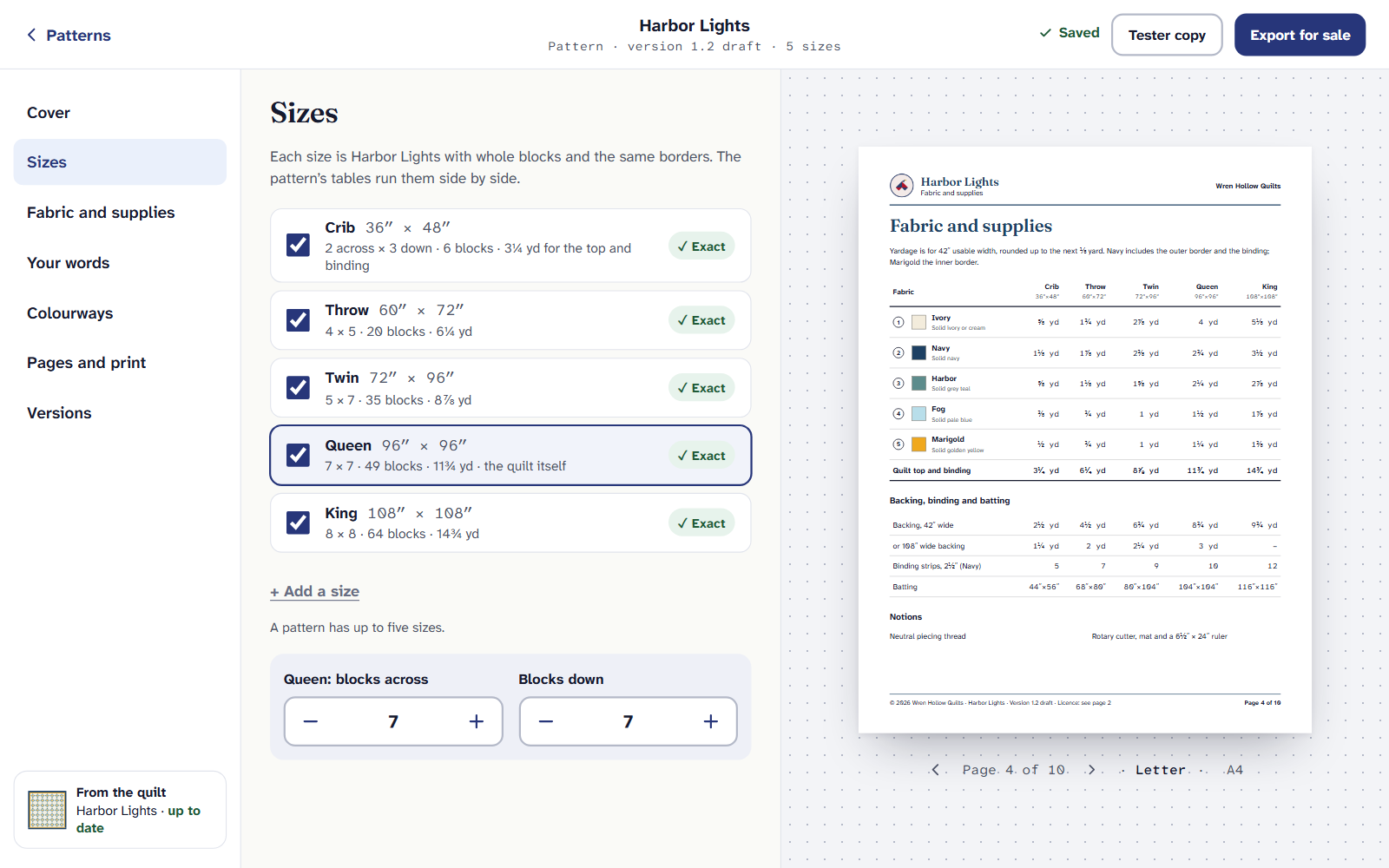
Sizes. Each is the quilt with whole blocks and the same borders. Tick a size to put it in the pattern, untick it to take it out. Choose a size’s name to change it.
Use the steppers to change how many blocks it has across and down (Blocks down). The finished size and every number follow.
To add one, choose Add a size. It starts at the next exact size the pattern doesn’t have yet.
A size marked Not exact can’t be made with whole blocks and the same borders, and the pattern says why. Under it, The nearest exact sizes are listed with their blocks and finished size: choose one to use it instead.
Some quilts have one size. A medallion, or a quilt designed around a turned center, is made at its own size only. The Sizes tab says so, and Keep the original size only puts it back if it was changed.
Fabric and supplies
Fabric and supplies lists each fabric by its number, with two boxes: your name for it, which goes through every table and sewing step, and What to buy, in words a shop understands (“a warm cream solid”, “navy tone-on-tone”). The yardage beside it is worked out for every size.
Type your name for each fabric, such as “Harbor” or “Background”.
Under What to buy, say what a buyer should look for. If you name a Quarter Inch Solids color, the app warns you that buyers can’t find it in a shop, and offers plain words to use instead.
Under Notions, one a line, list what else they’ll need: thread, a ruler, templates.
A second colorway
A colorway is the same quilt in different fabrics. A pattern can have one more besides its own, on a page of its own, swapping fabric for fabric, so the yardage and cutting stay the same.
Choose Colourways, then Add a colourway. It starts with a suggestion of fabrics that read apart in black and white.
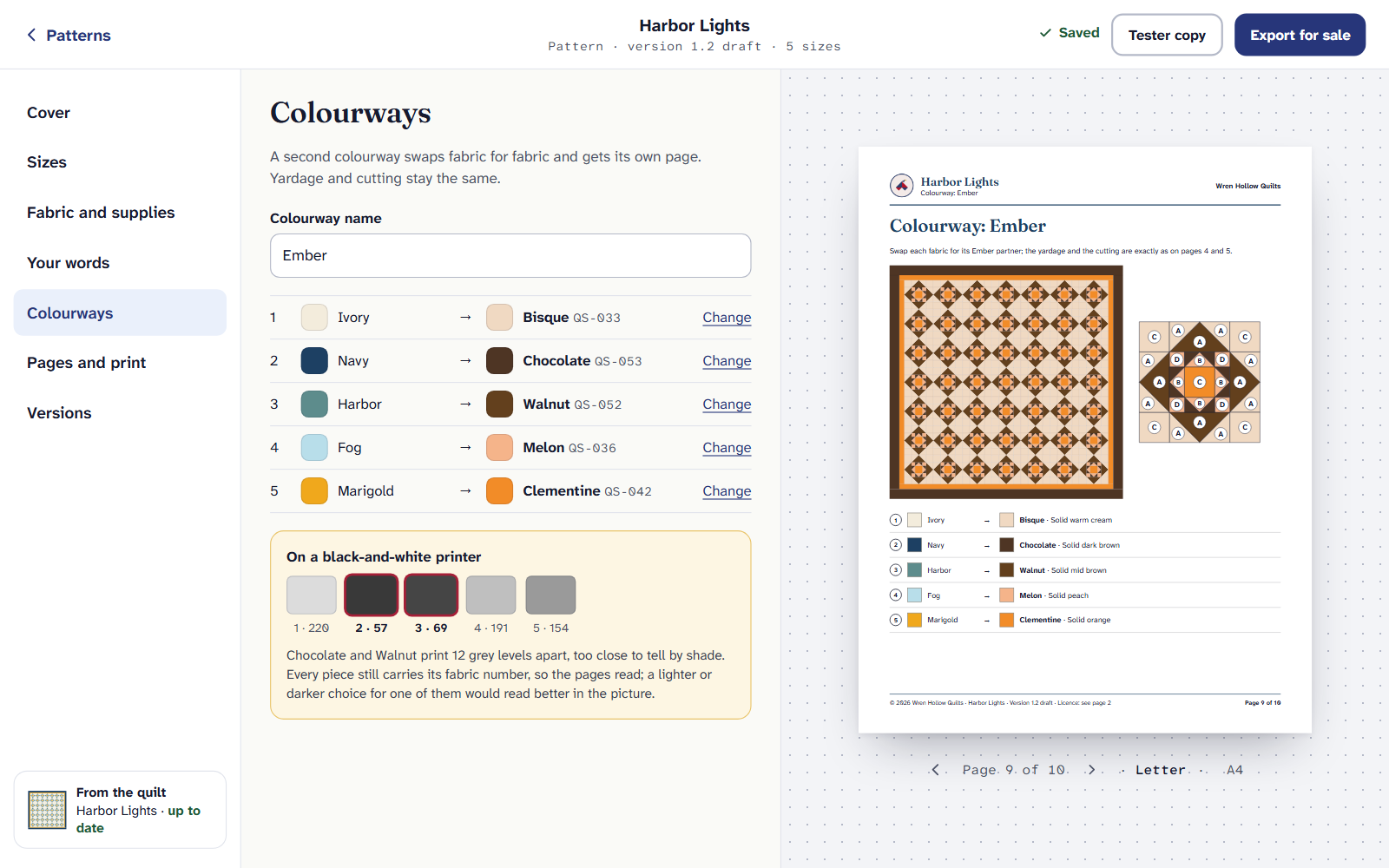
Colourways, with the black-and-white check under them. Give it a Colourway name. To swap a fabric, choose its Change.
Under On a black-and-white printer, each fabric shows the gray it prints as, from 0 to 255. If two are too close to tell apart by shade, it names them; change one.
Letter and A4
In Pages and print, under Editions, tick Letter, A4 or both. Each is laid out for its own paper, with its own contents and page numbers. The same tab lists the pages, and lets you leave out the ones that can be left out, such as the test square or the notes.
Sizes, fabric names, colorways and every other tab are part of Quilter. If Quilter ends, you can still open your patterns and print them for yourself.
If it doesn’t look right
- Add a size is grayed out. A pattern has up to five sizes. Untick one first.
- A yardage seems high. It’s worked out from the cutting plan of that size. Yardage, and how we worked it out explains it.
- There’s no second Add a colourway. A pattern has one colorway besides its own.
More for designers: Quarter Inch for pattern designers.
Checked against the app on
Questions
Short answers.
Something else? A real person replies.
hello@quarterinch.app
How many sizes can a quilt pattern have?
Up to five. Each is the same quilt with whole blocks and the same borders, and its yardage, cutting and sewing are worked out for that size.
Why is a size marked Not exact?
It can’t be made with whole blocks and the same borders. The pattern lists the nearest exact sizes to choose from instead.
Does a second colorway change the yardage?
No. It swaps fabric for fabric, so the yardage and cutting are the same; it gets its own page in the pattern.
Will my pattern print in black and white?
Yes. Every piece carries its letter and fabric number, and the Colourways tab warns you when two fabrics would print as nearly the same gray.