Using Quarter Inch · Quilting
Plan a quilt’s quilting: in the ditch, meander, edge to edge
Tap an area of the quilt, choose a design, and see the quilting drawn as thread over your fabrics, with its thread and widest space worked out.
The short answer
Choose how each area is quilted and see it drawn as thread over your fabrics. In the designer, choose Quilting, say how it will be quilted and choose Suggest a start. Or tap an area and choose a design: In the ditch, Cross-hatch, Meander, a stencil, or edge to edge over The whole quilt.
Quilting is the third way of tapping the quilt in the designer, beside Blocks and Paint. Tap an area, choose a design, and the lines are drawn over your fabrics as thread. Quilting never changes your piecing, the fabric to buy or the cutting chart.
Start a quilting plan
Open the quilt in the designer and choose Quilting, after Blocks and Paint.
Under How will it be quilted?, choose By hand, On my sewing machine or By a longarm quilter. Your answer only shapes the suggestion; you can still choose anything.
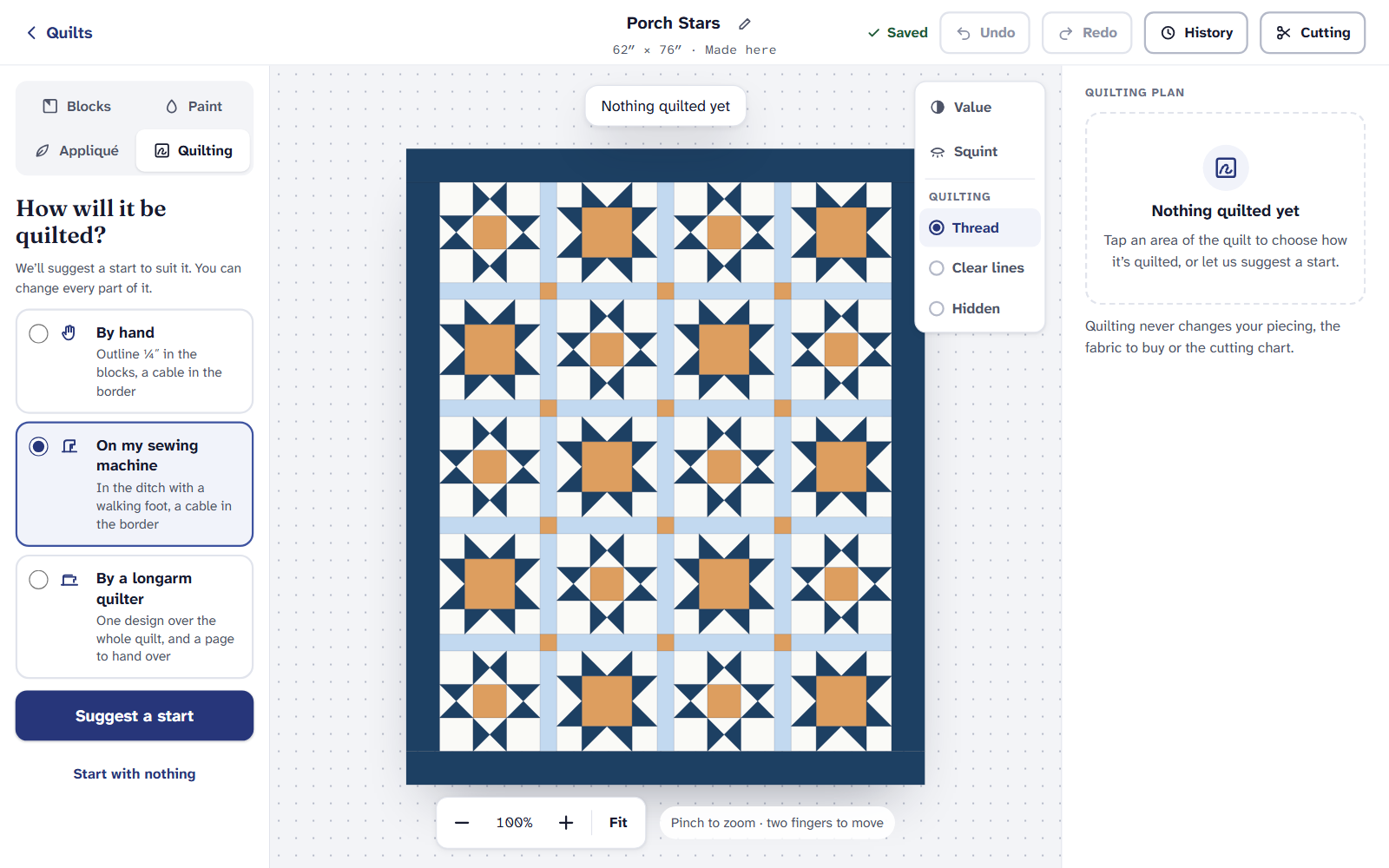
The first question. It changes only where you start. Choose Suggest a start for a plan to change, or Start with nothing.
Quilt an area
Under What tapping quilts, choose how much one tap reaches: Just this block, Every block like it, All the blocks, The sashing, The border or The whole quilt.
Tap the quilt. The area you’ve chosen shows in clear lines; the rest as thread.
Under Design, choose In the ditch, Outline ¼″, Straight lines, Cross-hatch, Echo, Meander or Stencil…. The sashing and border also have Down the middle.
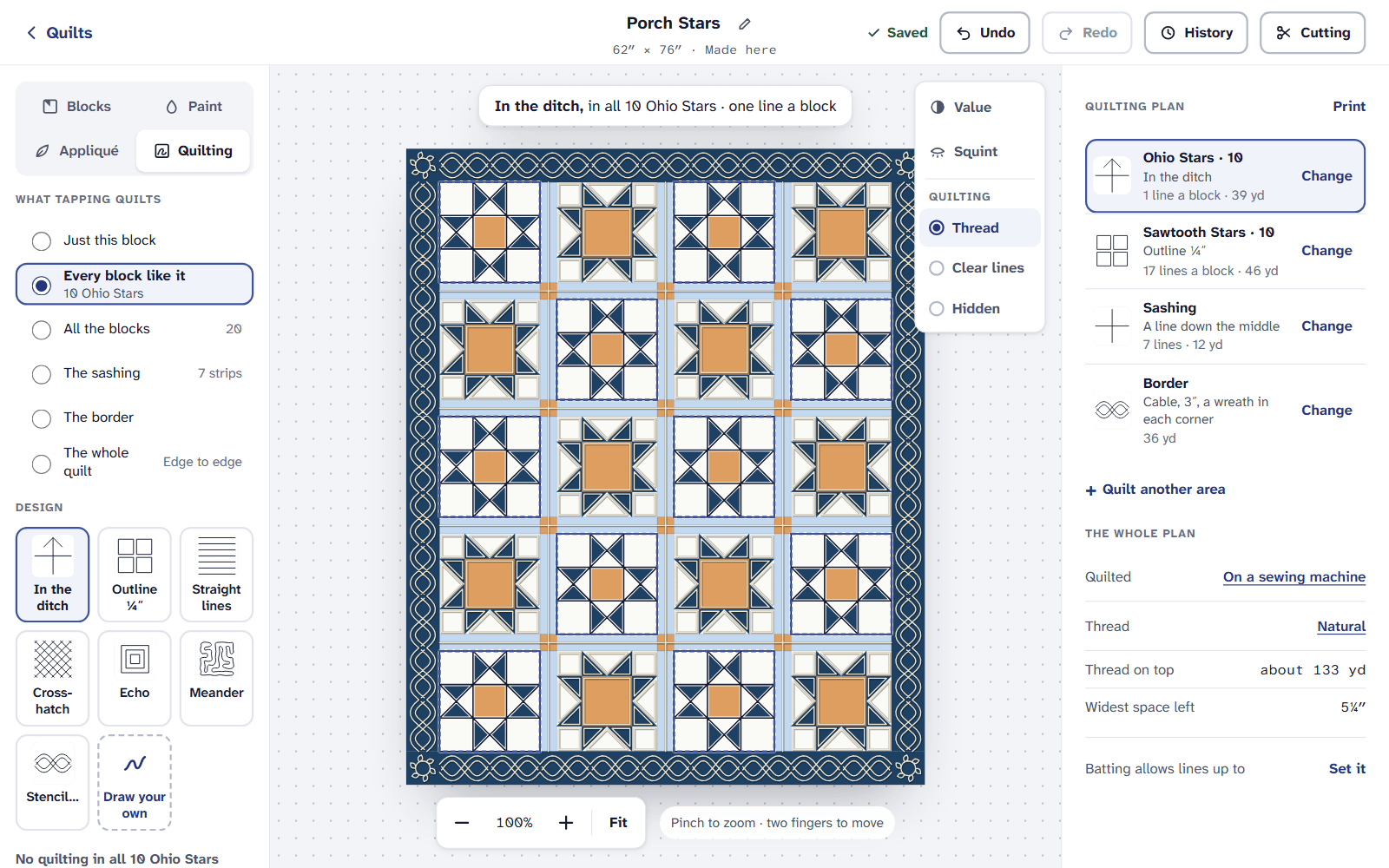
A plan, area by area, with the whole plan’s thread and widest space on the right. For straight lines, cross-hatch, echo and meander, set Lines apart. Straight lines and cross-hatch can run Diagonal or Straight.
Choose Quilt another area on the right for the next one, or Change beside an area in the plan to go back to it.
The whole quilt is edge to edge, one design over everything, the way most longarm quilters work. Its designs are under All-over designs: meander (Loose · 1½″, Medium · 1″ or Close · ¾″), Baptist fan, Loops, Clamshell, cross-hatch and straight lines.
Draw your own
With a block chosen, choose Draw your own.
Choose Freehand, Straight line or Curve, and draw once in one block. Under It repeats in, choose whether it goes in just this block or every block like it. Snap to seams makes ends land on corners.
If your drawing has more starts and stops than it needs, it says how many and offers to join them. Choose Done drawing when you’re finished.
Reading the plan
The Quilting plan on the right lists each area and its design. Under The whole plan it gives how it’s quilted, the thread, the Thread on top it uses, and the Widest space left with no quilting. Choose the thread’s name to set its Thread color, or switch on A thread for each area.
Your batting’s packet says how far apart its quilting lines can be. Set it beside Batting allows lines up to, and if a space is wider, the plan says so and rings it on the quilt.
Over the quilt, under Quilting, choose Thread, Clear lines or Hidden. Value and Squint still work, and change only the fabrics.
On an iPad or a phone
Every design, drawing your own and EQ’s stencils are on the Free plan. Printing the quilting pages needs Quilter.
If it doesn’t look right
- Nothing seems to change. Natural thread in the ditch on a light fabric barely shows. Choose Clear lines to see it.
- There’s no Sashing or Border to choose. They’re offered only when the quilt has them.
- The widest space is too big. Choose the area it names and add quilting there, or set lines closer.
New to choosing a quilting design? Quilting designs for beginners explains each one.
Checked against the app on
Questions
Short answers.
Something else? A real person replies.
hello@quarterinch.app
Does quilting change my cutting chart?
No. Quilting never changes your piecing, the fabric to buy or the cutting chart.
Can I plan edge-to-edge quilting for a longarm?
Yes. Choose The whole quilt, then an all-over design such as a meander or Baptist fan.
Can I draw my own quilting lines?
Yes. Choose Draw your own, draw once in one block, and it repeats in every block like it.
Is planning quilting free?
Yes. Printing the quilting pages needs Quilter.