Using Quarter Inch · Blocks
Find block pieces too small or too sharp to sew
Pieces too narrow, too small or too sharp to sew, found while you draw, in inches, at the size you’ll make the block. A warning, never a stop.
The short answer
The block editor warns when a piece is too narrow (under ½″ finished), too small, or has a knife point sharper than 20°, at the size you’ll make it. Open the numbered pin under Checks to see why and try a fix, or choose Keep them as they are.
While you draw, the block editor checks every piece at the size you’ll actually make the block. A piece that’s fine at 12″ can be too thin to sew at 6″, so the checks use real inches, say what’s wrong and why it matters at the machine, and offer fixes to try. They’re warnings, never stops: you can always save the block and use it.
What the checks look for
- Too narrow: a piece under ½″ wide, finished. With a ¼″ seam on each side, there’s almost nothing left to see, and it’s hard to sew accurately.
- Too small: a piece under ½″ every way, a tiny piece rather than a strip.
- Too sharp to sew well: a knife point, a corner sharper than 20°. Cut with its seam allowance, its tip runs a long way past where the points meet, and it’s hard to line up.
- Curves: a radius under 1″ is tight, and under ½″ too tight to piece. See Curved blocks with the Arc tool.
Two more checks are always there: Every line closes a patch (a line that closes nothing is dashed, and left out of the block when you save) and Every point is on the grid, so every size is exact.
Read a warning
While you drag a line, the pieces it would make are hatched before it’s drawn, and the tag at the pointer says why, for example “8 knife points, 14° at the tip”. You can still let go: it’s a warning, not a stop.
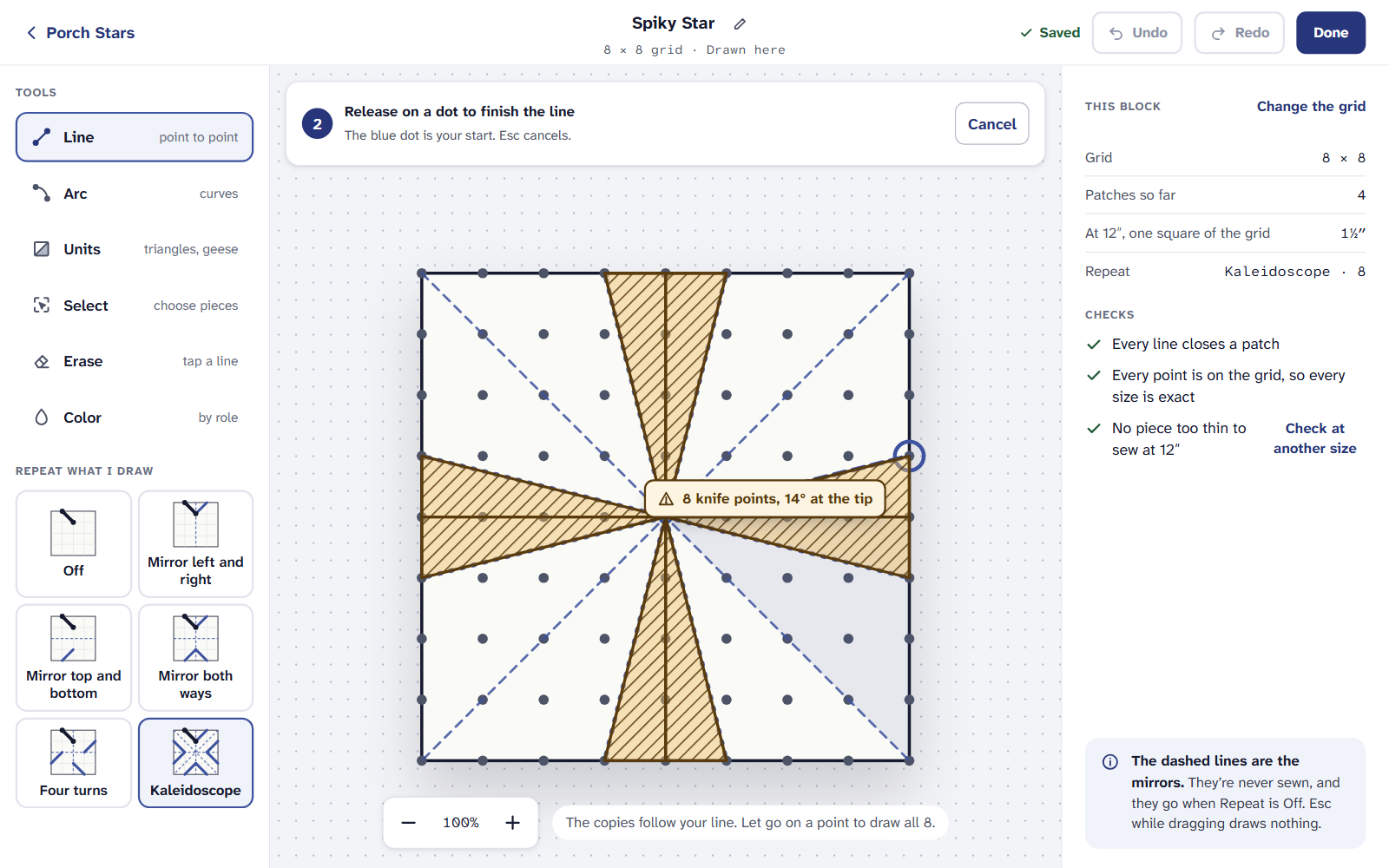
Hatched before you let go, with the reason at the pointer. Once drawn, each problem is hatched on the block with a numbered pin. Under Checks, the same number opens what’s wrong, why, and the piece drawn as it’s cut.
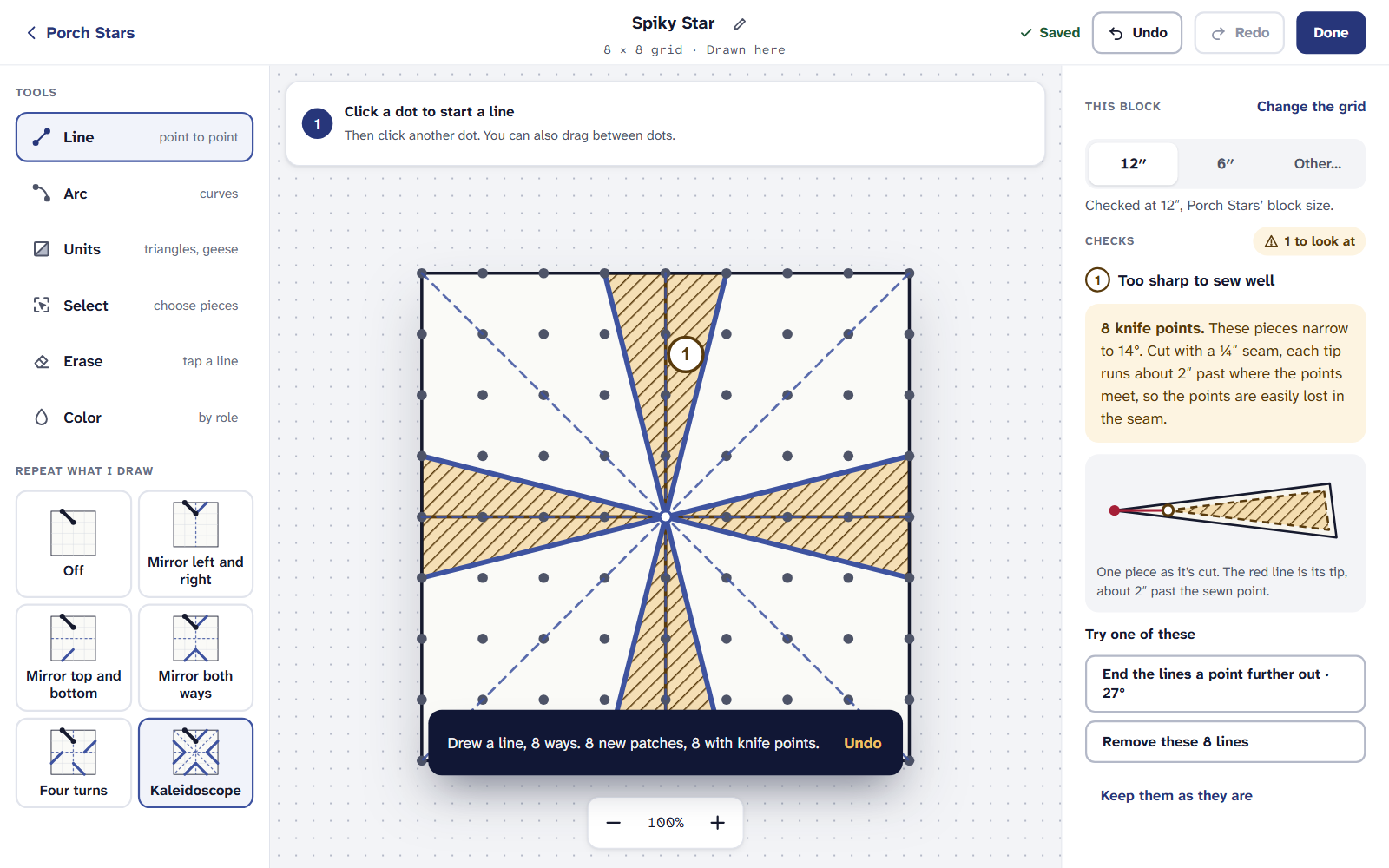
Each pin matches a row in Checks. Under Try one of these, choose a fix: end the lines a point further out, take them away, or a bigger block. It’s shown on the block in a band first; nothing changes until you choose Keep this. Put it back leaves the block as it was.
Happy with it as drawn? Choose Keep them as they are. The marks stop, and Checks says what you kept, for example “Kept as drawn: 8 knife points”.
Checked at the size you’ll make it
The checks use the size of the quilt you opened the editor from, and every quilt the block is in. The line under the sizes says which, for example “Checked at 12″, Porch Stars’ block size.” To check another size, choose Check at another size. A warning also says the size the block Sews well from, so you know how big to make it.
For thin pieces, foundation paper piecing is often the answer: see Foundation paper piecing for beginners.
On an iPad or a phone
Every check is part of the block editor, on the Free plan, with no limit on blocks. A block’s templates and cutting chart need Quilter.
If it doesn’t look right
- A warning at one size and not another. That’s right: the same piece is twice as wide in a 12″ block as in a 6″ one.
- A warning you kept is back. What you keep is remembered on the device you kept it on, so another computer or iPad shows it again.
- Nothing is checked. No piece too thin to sew means every piece is fine at that size.
Checked against the app on
Questions
Short answers.
Something else? A real person replies.
hello@quarterinch.app
How narrow is too narrow to sew?
The checks warn about a piece under ½″ wide, finished, at the size you’ll make the block.
What is a knife point?
A corner sharper than 20°. Cut with its seam allowance, its tip runs far past the seam, so it’s hard to match.
Do the warnings stop me saving the block?
No. They’re warnings. You can try a fix, keep the pieces as they are, and save and use the block either way.