Using Quarter Inch · Bringing quilts from EQ
See what came across from an EQ file: the Import report
Each EQ8 or EQ7 file you open or import gets a report that says, in plain words, exactly what came across and what didn’t.
The short answer
Every EQ file you bring across gets a report that says, in plain words, what came across and what didn’t. Choose Import report from the quilt’s ⋯ menu. At a glance sorts the file into ✓ Drawn exactly, ✓ Matched, Redraw, Not drawn yet and Kept in your original.
Open a file’s report
In your library, open the quilt’s ⋯ menu and choose Import report. Or, on the quilt’s own page, choose See the full report.
The report opens on What came across: one line summing up the file, then At a glance.
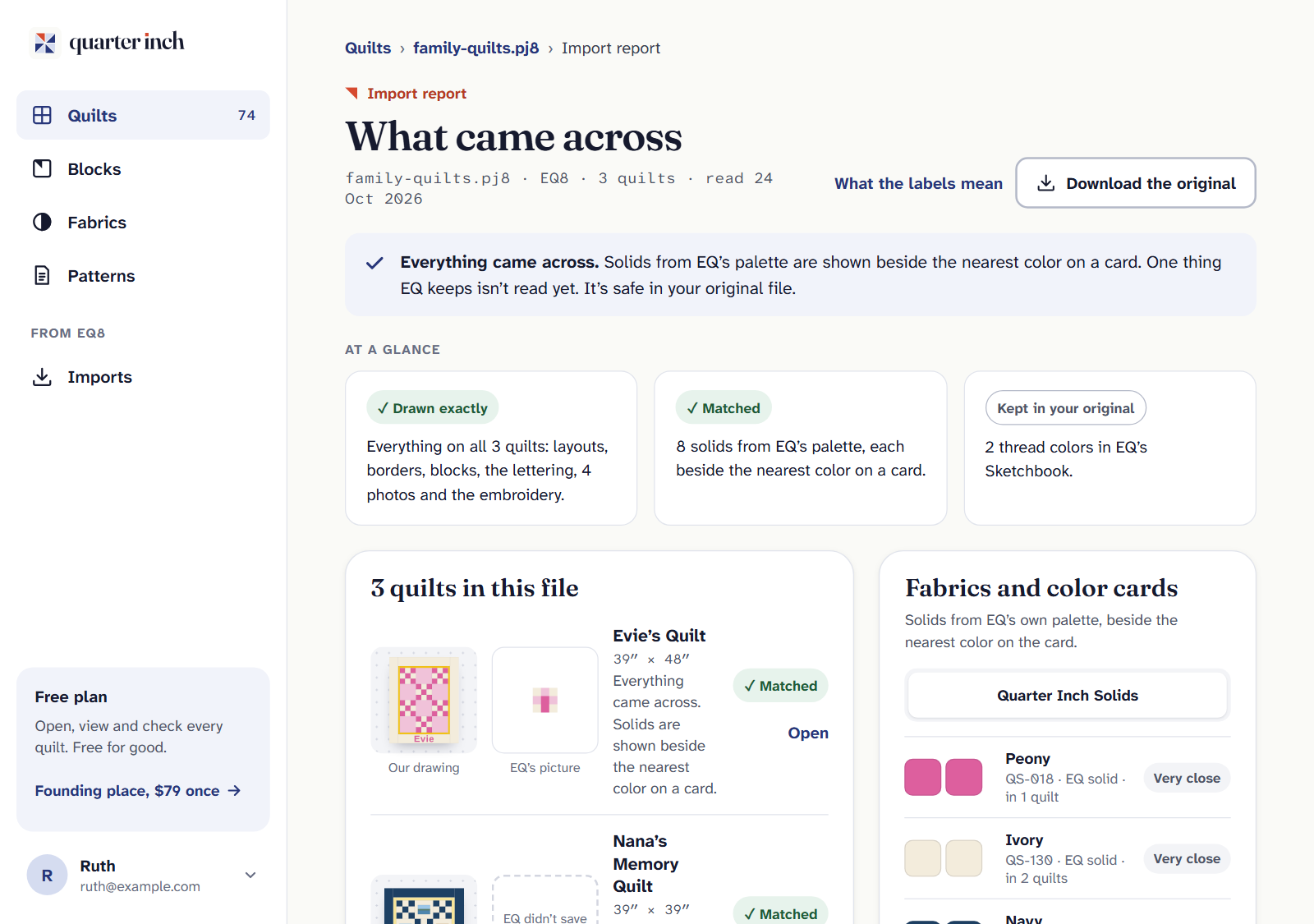
Every file has a report, in plain words.
At a glance
The report sorts everything in the file into a few groups, in the same words the library and Imports use:
| Group | What’s in it |
|---|---|
| ✓ Drawn exactly | What we draw just as EQ had it: layouts, blocks, borders and more. |
| Redraw | Drawn, but not quite as EQ has it yet. Worth a look before you cut. |
| Not drawn yet | Something we can’t draw yet. |
| ✓ Matched | EQ’s solid colors, shown beside the nearest color on a color card. |
| Kept in your original | Parts we don’t read yet. They’re safe in your EQ file, and in our copy of it. |
What the labels mean, on the report, says the same in a line each.
The rest of the report
- The quilts in this file. Each quilt, with its picture and its label. A file can hold several quilts.
- Everything in the file. Every part, row by row: layout, blocks, borders, appliqué and the rest, each with its label. Choose Show me where to see a part on its quilt.
- Fabrics and color cards. Each solid from EQ’s own palette beside the nearest color on the card, with a word for how close: very close, close, or the nearest we have. Prints keep EQ’s swatch.
- Prints. If the file has prints with EQ’s swatch, the report links to save them to My fabrics. See Save your EQ prints to My fabrics.
- Download the original. Your EQ file, exactly as you brought it, when we kept a copy.
If it doesn’t look right
- A part says Redraw. Open the quilt and switch between Our drawing and EQ’s picture to compare. If something matters for cutting, check that part in EQ8.
- A quilt says Not yet. We can’t draw it yet. It’s kept safe, and when our reader learns it, the quilt shows Update ready. See Update ready.
- No Download the original. We didn’t keep a copy: Keep a copy of my original files is off on your account page.
Checked against the app on
Questions
Short answers.
Something else? A real person replies.
hello@quarterinch.app
What does “Kept in your original” mean?
Parts of the EQ file we don’t read yet. They stay safe in your EQ file, and in our copy of it if you keep one.
What does “Matched” mean in the report?
EQ’s own solid colors have no fabric behind them, so we show each beside the nearest color on a color card, with how close it is.
What should I do about a part to redraw?
Compare Our drawing with EQ’s picture on the quilt’s page. If the part matters for cutting, check it in EQ8 before you cut.
Can I download my original EQ file again?
Yes, with Download the original, as long as Keep a copy of my original files is on.