Using Quarter Inch · Quilting
Print for your longarm quilter
One page to hand over with the top: its size, the backing and batting, the quilting and thread. Plus the plan and stencils, at true size.
The short answer
Print one page to hand over with the top: its size, the backing and batting, the quilting and thread. In the designer’s Quilting, choose By a longarm quilter, then Print the hand-over page, or tick For your longarm quilter under Quilting in the Cutting page’s Print. Printing needs Quilter.
When someone else quilts your top, they need its size, the backing and batting sizes, and what you want quilted. Quarter Inch prints all of it from the quilt itself, on a page to hand over with the top, beside the quilting plan and its stencils at true size.
Print the hand-over page
In the designer, choose Quilting. Under How will it be quilted?, choose By a longarm quilter, then plan it, or choose Suggest a start for one design edge to edge. Plan how it’s quilted has the steps.
On the right, under For your longarm quilter, check the sizes of the quilt top, the backing and the batting.
Choose Print the hand-over page. The Print dialog opens with the quilting pages ticked.
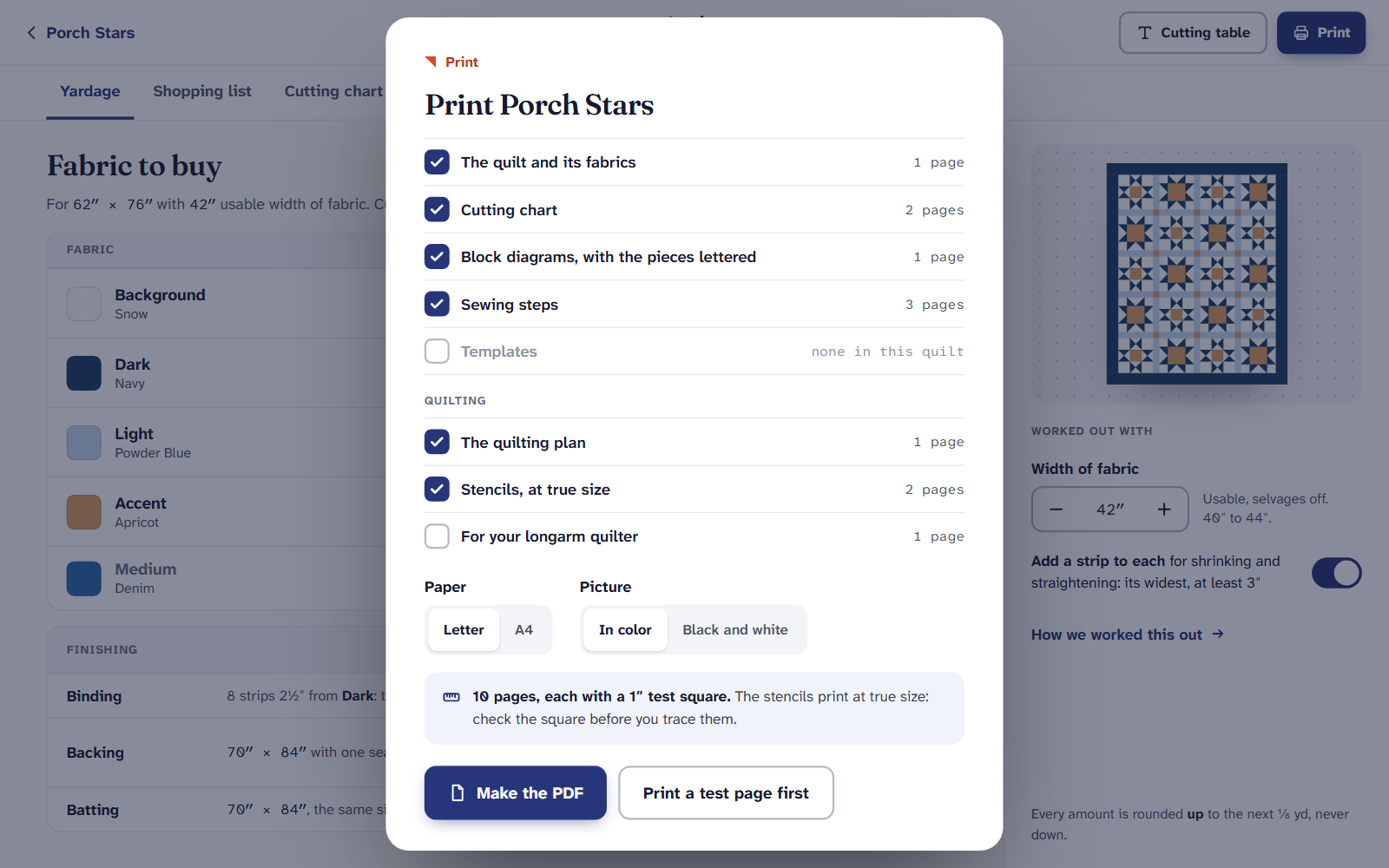
The quilting pages, a group of their own in Print. Choose your paper, Letter or A4, then Make the PDF. When Your PDF is ready, choose Download and print it at actual size.
What’s in the quilting pages
You can also reach them from the quilt’s Cutting page: choose Print, and under Quilting tick what you want:
- The quilting plan: the quilt with its quilting drawn, each area and its design, the thread, the widest space left, and an order to stitch in. It’s to scale, not true size.
- Stencils, at true size: each stencil to trace or mark, with 1″ and 2 cm squares to check the print. A border stencil shows where each repeat joins the last.
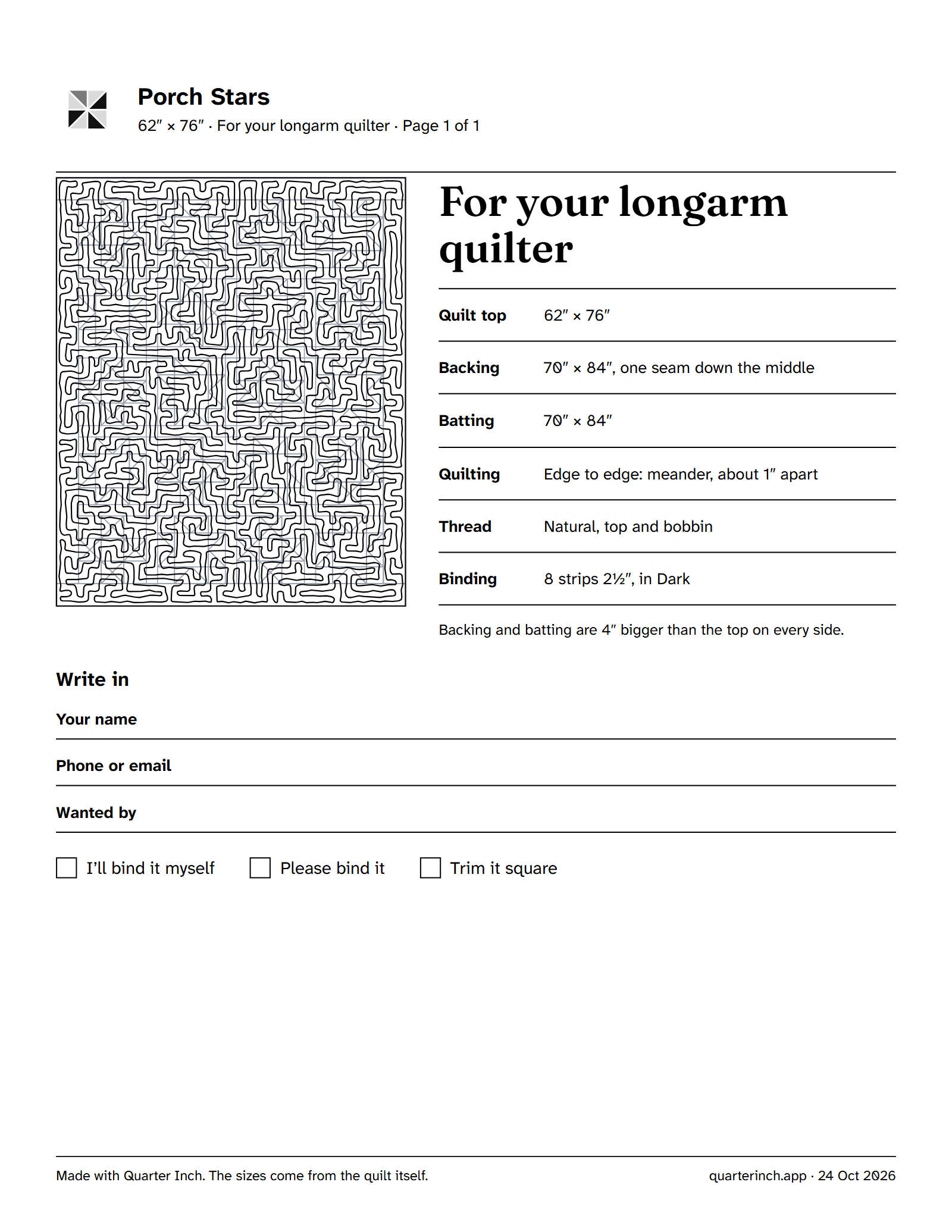
- For your longarm quilter: one page with the quilt top’s size, the backing (and where its seams go), the batting, the quilting, the thread for top and bobbin, and the binding. It has space to write your name, a phone number or email and when you want it back, and boxes to tick for binding and trimming.
Every size on the page comes from the quilt itself, so it matches your Yardage.
Before you hand it over
- Measure the test square on a stencil page. If it isn’t exactly 1″, the page was scaled when printed.
- Ask your quilter how much bigger than the top they want the backing and batting, and check the sizes on the page against what they say. Working with a longarm quilter covers what to ask.
On an iPad or a phone
Planning the quilting is free on every plan. Printing the quilting plan, stencils and hand-over page is part of Quilter, $9 a month or $89 a year. On the Free plan, Print the hand-over page opens the Quilter offer.
If it doesn’t look right
- There’s no Quilting group in Print. The quilt has no quilting yet. Plan some in the designer first.
- There’s no hand-over page on the right. It’s shown when the quilt is quilted By a longarm quilter. Choose the method under The whole plan’s Quilted line.
- The stencils printed small. The print window was set to fit the page. Print at actual size and measure the square again. The test square.
Checked against the app on
Questions
Short answers.
Something else? A real person replies.
hello@quarterinch.app
What does my longarm quilter need from me?
The quilt top’s size, a backing and batting bigger than the top, and what you want quilted. The hand-over page has all of it.
Are the stencils printed at true size?
Yes, with 1″ and 2 cm squares on the page to check. The quilting plan itself is to scale, not true size.
Can I print the quilting plan on the Free plan?
Planning is free; printing the quilting pages needs Quilter.
Can I send the PDF instead of printing it?
Yes. Download it, or on a phone choose Share or print, and send it to your quilter.