Using Quarter Inch · Blocks
Draw curved quilt blocks: quarter circles and arcs
Quarter circles and bent lines, each an exact part of a circle, with its radius in inches and how easy it is to sew.
The short answer
Draw quarter circles and bent lines, each an exact part of a circle, checked for whether it’s gentle, tight or too tight to piece. In the block editor, choose Arc; for a Quarter circle, drag from the circle’s center to the corner of its square. To Bend a line, draw a line and drag its middle: it snaps to exact bends.
The Arc tool draws curves that are exact parts of circles, so every curve has a radius you can measure, every size is exact, and its templates cut true. There are no Bézier handles to wrestle with: you draw a quarter circle, or you bend a line, and it snaps to the nearest exact curve.
Draw a quarter circle
In the block editor, choose Arc. Under Two ways to draw a curve, choose Quarter circle.
Press on the point that’s the circle’s center, and drag to the corner of the square it fills. Or tap the center, then the corner.
Let go. The curve is drawn, and the panel gives its radius at 12″. With Repeat what I draw on, it’s drawn in every corner at once, the way a Drunkard’s Path is.
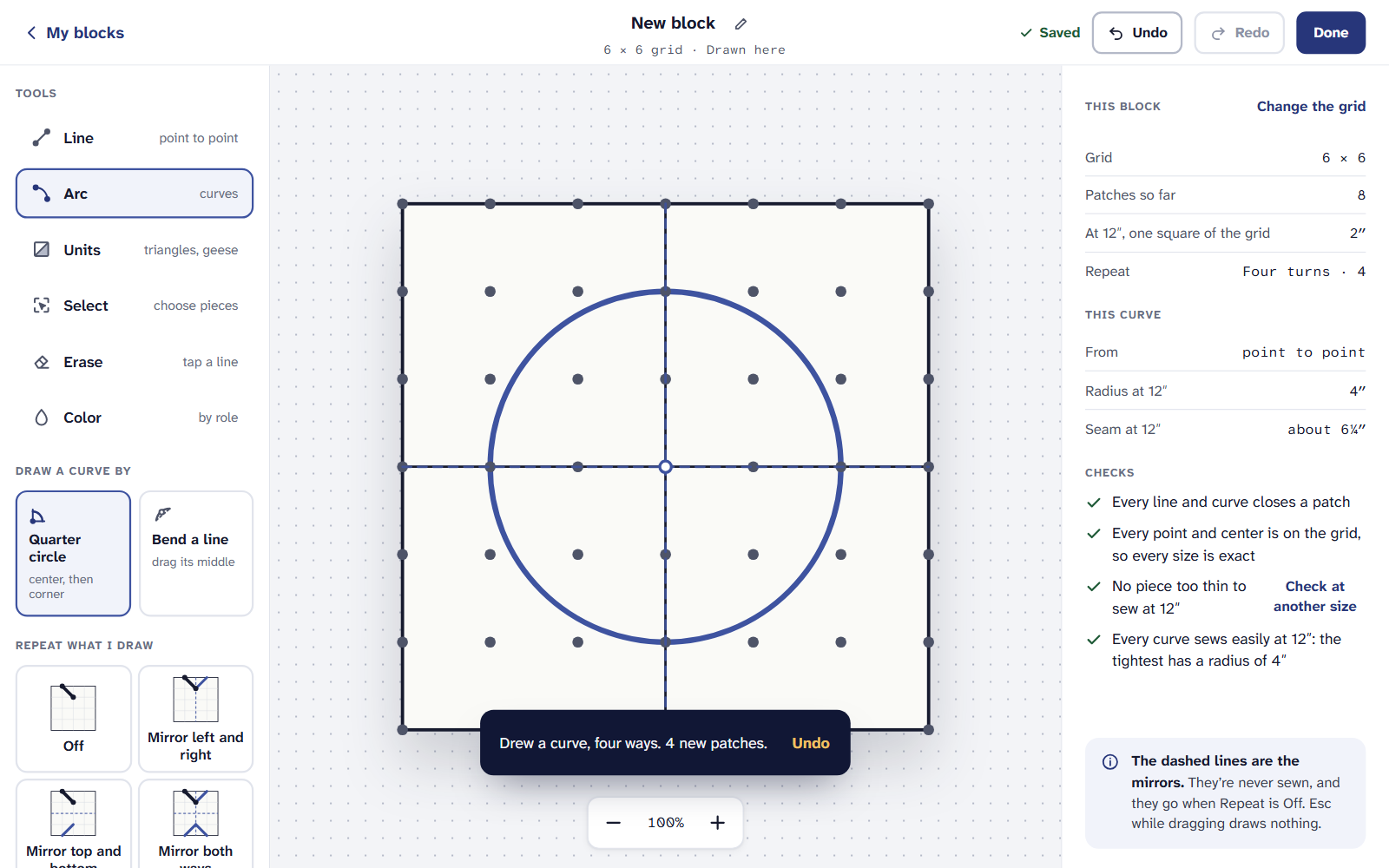
A quarter circle: from its center to a corner.
Bend a line
With Arc, choose Bend a line. Draw a line from point to point, then drag the round handle at its middle.
Every bend the grid allows shows faintly while you drag. The curve holds the nearest one, never a curve in between, and the tag says which, for example Bend 4 of 5 · exact, with its radius.
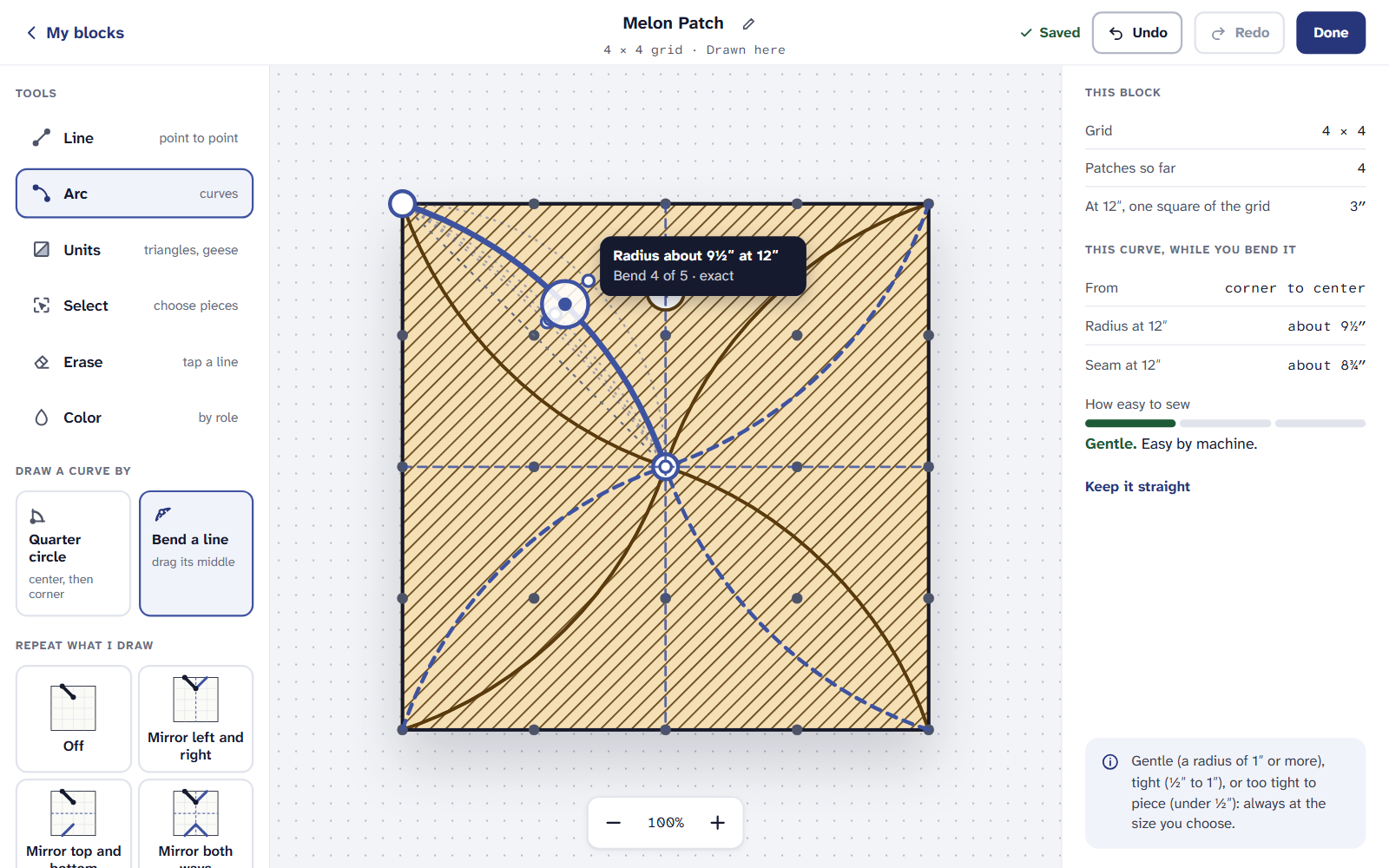
The curve snaps from one exact bend to the next. To change a curve later, tap it. This curve shows its radius and how easy it is to sew, with Turn it the other way, Straighten it and Take it away.
A short line on a coarse grid may have no exact bend at all. The editor says so, and offers Make the grid with a finer grid that has one, for example 8 × 8 instead of 4 × 4. Every line you’ve drawn stays where it is.
How easy it is to sew
A curve’s radius, at the size you’ll make the block, says how easy it is to sew. The checks give one of three, under How easy to sew:
- Gentle. A radius of 1″ or more: easy by machine.
- Tight. ½″ to 1″: Sews with care: pin at every notch.
- Too tight to piece. Under ½″. Nothing stops you drawing it: it’s offered as appliqué when you cut it.
The same curve is gentle in a big block and tight in a small one, so the editor checks it at the size you’ll make it. For sewing them, see How to sew curved seams.
Curved blocks from EQ
EQ draws most curves freehand, as many short straight edges. To change one in Quarter Inch, open the quilt, choose Change this quilt, tap the block and choose Edit a copy of its shape. Quarter Inch asks once how its curves should come across:
- Smooth them into arcs (recommended): never more than 1/32″ from EQ’s line at the block’s size. You can bend them, and their templates get notches.
- Keep them as EQ drew them: exactly EQ’s shape. You can color the pieces and draw lines to the curves’ ends, but not reshape the curves.
Then choose Make my copy. It’s a copy in My blocks: the quilt keeps EQ’s block until you place the copy, and the toast has Keep EQ’s instead if you change your mind.
Cutting curved pieces
Curved pieces are cut from templates, printed at true size, with the seam allowance following the curve. Notches are numbered so the two pieces match, a long curve gets more than one, and a tight inward curve gets clip marks. How to sew gives the curved seam step by step.
On an iPad or a phone
The Arc tool and opening curved blocks from EQ are on the Free plan, for up to 3 quilts at a time. Curved templates, the cutting chart and the PDF need Quilter, $9 a month or $89 a year.
If it doesn’t look right
- A curve wasn’t drawn. There’s no point on the grid for it to curve around. The editor shows the nearest curve that works; try it, or a finer grid.
- The curve won’t follow your finger. It moves between exact bends only, so it jumps rather than slides. That’s what makes its template exact.
- An EQ curve stays as EQ drew it. A curve that would need more than eight arcs to follow EQ’s line closely is kept as it is, and says why.
Checked against the app on
Questions
Short answers.
Something else? A real person replies.
hello@quarterinch.app
How do I draw a Drunkard’s Path block?
Choose Arc, then Quarter circle. Press on a corner of a square, the circle’s center, and drag to the opposite corner of that square. Repeat what I draw puts it in every corner at once.
How tight a curve can I piece?
The checks call a radius of 1″ or more gentle, ½″ to 1″ tight, and under ½″ too tight to piece, at the size you’ll make the block.
Can I change curved blocks from my EQ8 files?
Yes. Edit a copy of its shape asks once whether to smooth EQ’s curves into arcs or keep them exactly as EQ drew them.