Using Quarter Inch · Changes and versions
Use Quarter Inch on a computer, iPad and phone
Sign in on each device with the same email. Every change saves as you go, and the quilt is the same wherever you open it.
The short answer
Your quilts are the same on every device you sign in to with the same email, and changes save as you make them (Saved at the top). Offline, they wait on the device and go when you’re back. If two devices change the same square, the newest wins and you can Place it again.
Your quilts are kept with your account, not on one device. Design at the computer, cut with the iPad propped by the mat, and check the shopping list on your phone: each shows the same quilt.
Use another device
On the other device, open app.quarterinch.app in its browser and sign in with the same email. We send a code to type in: no password. Signing in with an email code.
Your library is there, with every quilt as you last saved it.
How changes are saved
Every change is saved as you make it. The top of the designer says Saving…, then Saved. There’s no Save button to remember.
If the connection drops, it says Not saved yet and We can’t reach Quarter Inch right now. Keep working: your changes are kept on the device and sent as soon as it’s back online. If you try to leave the page while changes are waiting, the browser asks first.
Changes on two devices at once
Change different parts of a quilt on two devices and both changes are kept. When a device opens a quilt again, after being in the background or offline, it fetches the newest version first.
When both devices changed the same square, fabric or name, the newest version wins, and the designer tells you:
A notice says the quilt changed on your other device (“changed on your iPad”), and names what of yours didn’t go on, like “Churn Dash in row 2, block 2”.
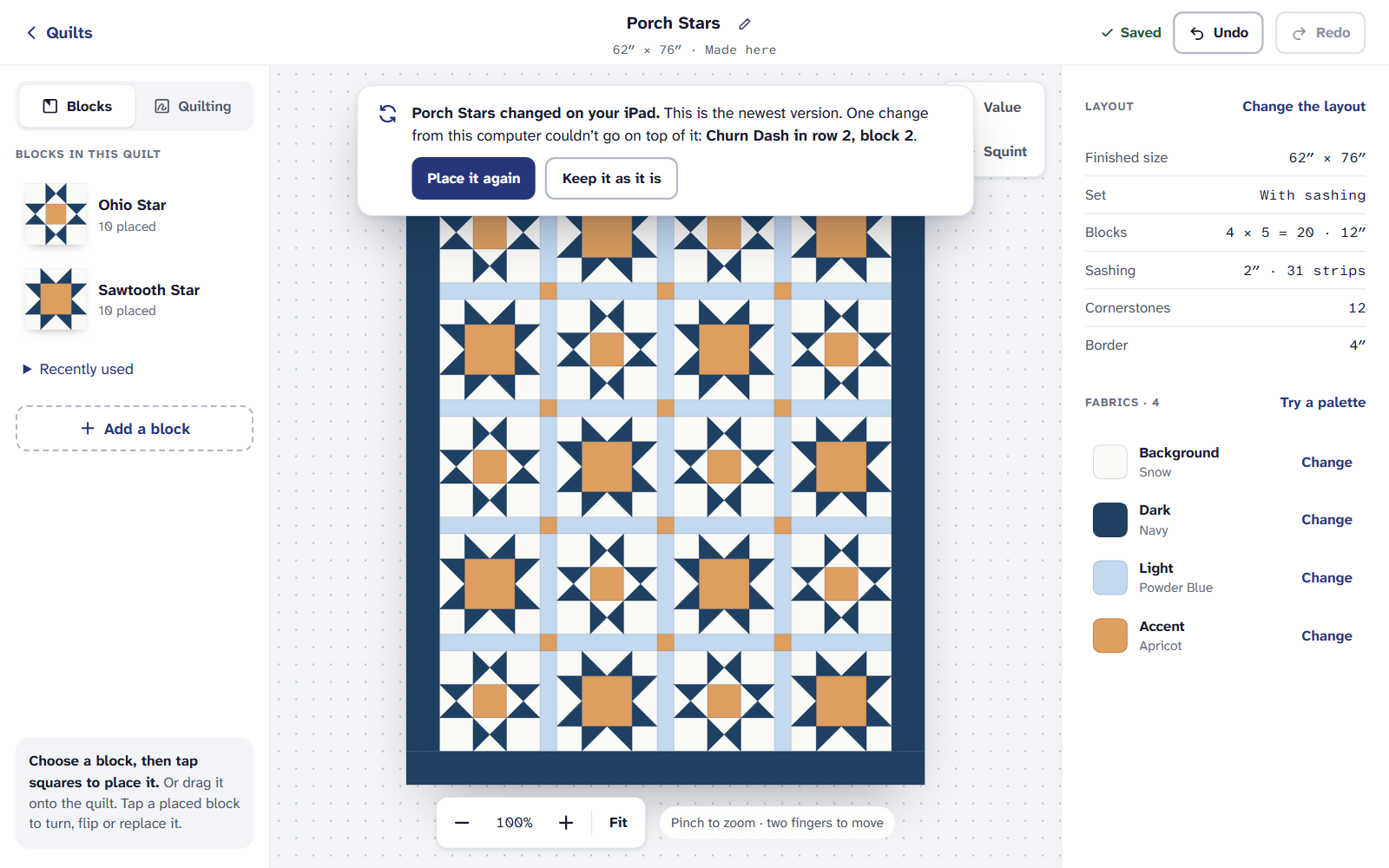
The quilt changed on another device: put yours back, or keep it as it is. Choose Place it again to put your change back on top, or Keep it as it is.
What follows you, and what stays
- On every device: your quilts, My fabrics and your stash, Earlier versions, and your ticks on the cutting chart and How to sew.
- On this device only: the Undo list in History, under Undo, on this computer (or iPad, or phone). See Undo, History and earlier versions.
On an iPad or a phone
If it doesn’t look right
- A change isn’t on my other device. Check the first device says Saved. If it says Not saved yet, it’s waiting for a connection.
- My library is empty on the new device. You may have signed in with a different email. Sign out and sign in with the one you used before.
- Undo doesn’t list what I did on the computer. Undo stays on the device you made the change on. Use Earlier versions instead.
Checked against the app on
Questions
Short answers.
Something else? A real person replies.
hello@quarterinch.app
Do I need to save my quilt?
No. Every change is saved as you make it. The top of the designer says Saved.
Can I work without internet?
Keep working if the connection drops: changes wait on the device and are sent when it’s back online.
What if I change a quilt on two devices at once?
Changes to different parts are both kept. If both changed the same part, the newest wins, and the designer offers Place it again.
Does it cost more to use several devices?
No. Every plan works on every device you sign in on.