Using Quarter Inch · Color and fabrics
Add your own fabrics
Photograph the fabric you own, a whole pack at once, or mix a color, and design with it in any quilt at its real size.
The short answer
Design with the fabric you own, from a photo or a color you mix, and photos are drawn at the size of fabric they show. Go to Fabrics, My fabrics, Add fabrics, then choose One photo, Many photos at once, A pack, in one photo or A color.
My fabrics holds the fabric you design with: photos of fabric you own, colors of your own, card colors you’ve saved, and prints saved from your EQ files. Each one can be used in any quilt. Start at Fabrics in the menu, then My fabrics, and choose Add fabrics. The menu offers:
- A pack, in one photo: a charm pack, layer cake, mini charms or fat quarters you’ve just bought;
- Many photos at once: a shelf of fabric, a photo of each;
- One photo: one fabric;
- A color: mixed, typed as a hex, or picked from a photo;
- A card color you own: a Quarter Inch Solids color you’ve bought, with how much you have.
Photos are drawn in your quilts at the size of fabric they show, so a print looks as big on screen as it is on the bolt.
Add one photo
Lay the fabric flat, in daylight, and take a photo of it with your phone’s camera.
Choose Add fabrics, then One photo, and choose the photo.
Drag the square onto the fabric, away from folds and shadows. A bigger square shows more of the print.
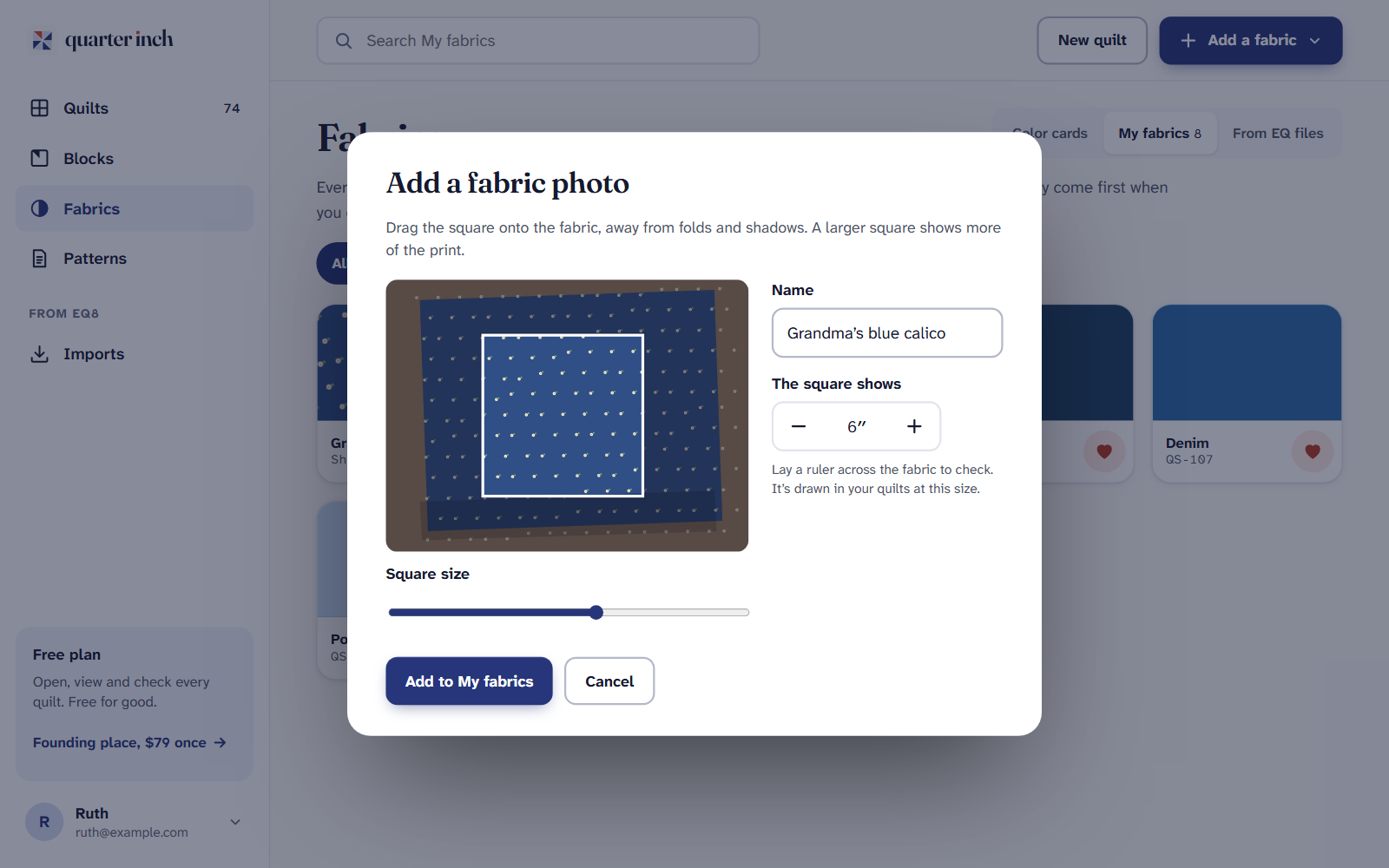
Drag the square, then say how much fabric it shows. Give it a name, and under The square shows, set how many inches of fabric the square covers. Lay a ruler across the fabric to check.
Choose Add to My fabrics.
A photo must be a JPEG, PNG or WebP picture, up to 20 MB. A photo from an iPhone that a computer can’t open is turned into a JPEG first.
Add a shelf of photos
Take a photo of each fabric with your phone’s own camera. Fill each photo with one fabric.
Choose Add fabrics, then Many photos at once. Under How much fabric does each photo show?, choose About 6″ or About 12″, then Choose photos and pick them all.
Each photo is cut to a square and named by its nearest color, like “Indigo print”. Give amounts now, tapping an amount and then every fabric that has it, or choose Skip amounts for now.
Check the photos. Two that look alike, or one that’s blurred, are pointed out for you to keep or leave out. Then choose the Save button, which says how many fabrics it saves.
Nothing is sent until you save, and Undo takes the whole batch back.
Add a pack in one photo
Choose Add fabrics, then A pack, in one photo. Under Which pack is it?, choose Charm pack, Layer cake, Mini charms or Fat quarters.
Under How many pieces?, count yours. Type the name on the label if you like: every print gets it. Choose Next: lay it out.
Lay the pieces on a cutting mat or a plain table, a finger’s width apart, and take one photo from straight above. Then Choose the photo.
Each piece is found, straightened and drawn at its true size, because the pack says how big each piece is. The count is checked against yours; if a piece is missing, it says so. Choose the Save button, which says how many prints it saves.
The prints are kept together as one pack in My fabrics. Jelly rolls and other strips come later, because a strip doesn’t lie flat in a photo. If the photo can’t be read, Many photos at once still works.
Add a color of your own
Choose Add fabrics, then A color.
Mix it with Hue, Strength and Light or dark, or type its six-character hex from a shop’s website. With fabric photos in My fabrics, choose Pick from a photo and tap the color.
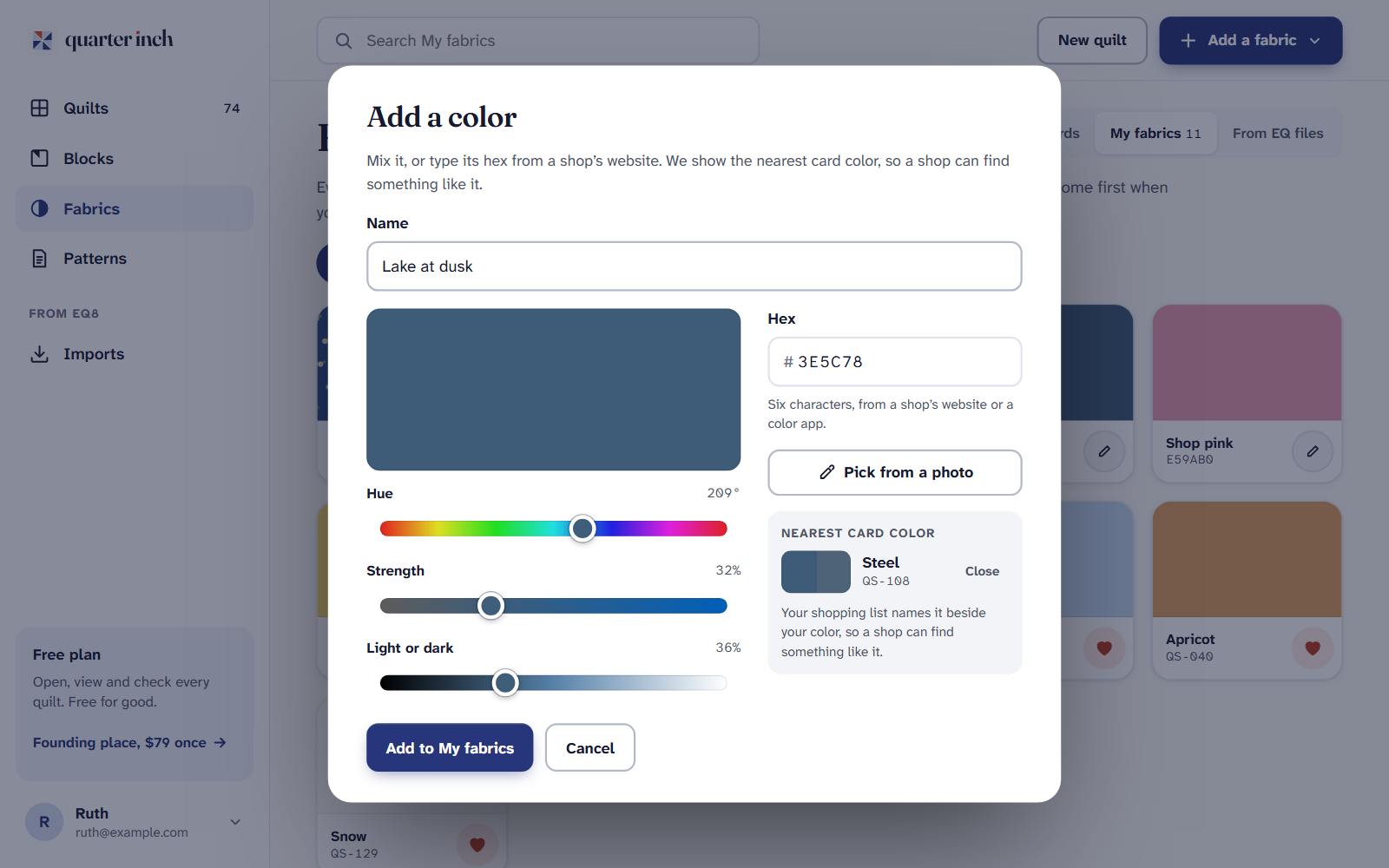
A color of your own, beside the nearest Quarter Inch Solid. Name it and choose Add to My fabrics. Its nearest card color is named beside it, so a shop can find something like it.
Prints from your EQ files
Prints in quilts you’ve brought from EQ8 or EQ7 can be saved to My fabrics with their own swatch, on the From EQ files tab. Save your EQ prints to My fabrics has the steps.
On an iPad or a phone
Adding photos, colors and packs is free, and so is using them in any quilt. My fabrics holds up to 500 photos and prints, and 500 colors.
If it doesn’t look right
- A print looks too big or too small in the quilt. The size of fabric the photo shows is off. Open the fabric in My fabrics and change it.
- A photo won’t open. Choose a JPEG, PNG or WebP photo under 20 MB.
- A pack’s photo found only a few pieces. Lay them on something plain, hold the phone flat above them, and try again.
Checked against the app on
Questions
Short answers.
Something else? A real person replies.
hello@quarterinch.app
How do I get my fabric into Quarter Inch?
Photograph it flat in daylight, then choose Add fabrics, One photo, and say how much fabric the photo shows.
Can I add a whole charm pack at once?
Yes. Lay it out, take one photo, and choose A pack, in one photo. Each print is cut out and drawn at its true size.
Why does it ask how much fabric a photo shows?
So a print is drawn at its real scale in your quilts: a 1″ flower looks like a 1″ flower.
Does Quarter Inch use my camera?
No. You take photos with your phone’s own camera and choose them; nothing is sent until you save.