Using Quarter Inch · Blocks
Make a symmetrical quilt block: repeat, mirror, kaleidoscope
Draw one corner and get all four. Mirror, turns and kaleidoscope copy every line exactly, as you draw it.
The short answer
Draw one corner of a block and get all four: each line is copied exactly as you draw it. In the block editor, choose Line, then a picture under Repeat what I draw: Mirror left and right, Four turns, Kaleidoscope and more. The copies come as you drag, in one step for Undo.
Most blocks are the same all the way around. Repeat what I draw copies each line as you draw it: mirrored, turned, or both. Draw one corner, and the other three are drawn with it, exactly, in one step for Undo.
Turn on Repeat
In the block editor, choose Line or Arc. Under Repeat what I draw, each choice is a picture of one stroke and its copies. Choose the one that looks like the block you want:
- Mirror left and right, Mirror top and bottom or Mirror both ways: a mirror image across the middle.
- Four turns: the line turned a quarter each time, like a pinwheel.
- Kaleidoscope: the turns and their mirror images together, like a star. On squares that’s 8 copies of every line.
The mirrors show as dashed lines over the block. Start a line: its copies follow your pointer, finger or Pencil while you drag, and a tag says how many lines you’ll get.
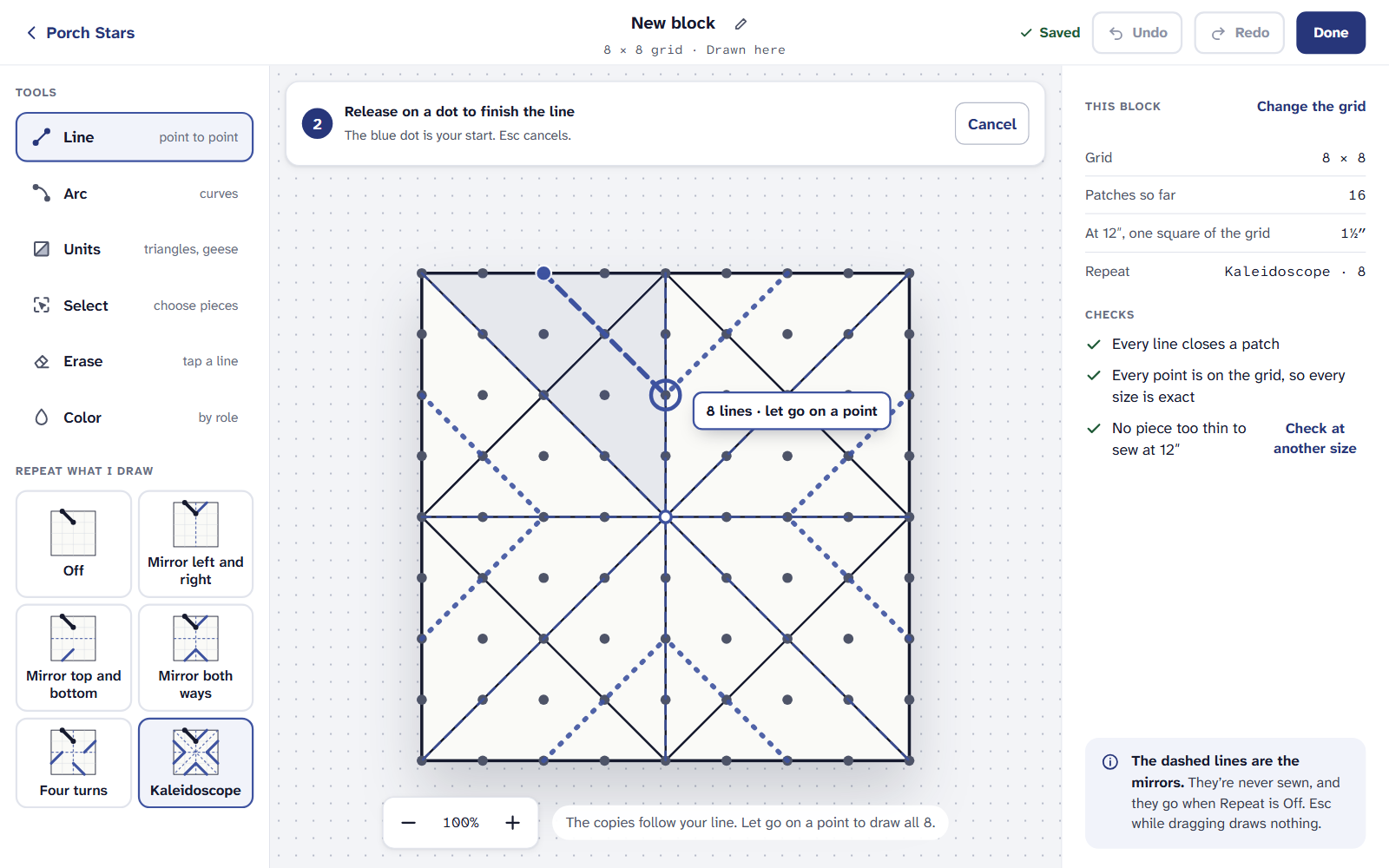
The copies follow the line while you draw it. Let go. Every copy is drawn, and the note says what happened, for example “Drew a line, 8 ways. 16 new patches.” One Undo takes back all of them.
Repeat works with Arc too: a turn keeps a curve’s direction, a mirror turns it the other way. It stays on for that block until you choose Off.
What each grid offers
Each grid offers only the repeats it can draw exactly, so every copy lands on the grid’s points:
- Squares: Off, Mirror left and right, Mirror top and bottom, Mirror both ways, Four turns, Kaleidoscope. Kaleidoscope makes 8 copies of each line.
- 45° star: Off, Mirror left and right, Four turns, Eight turns, Kaleidoscope. Kaleidoscope makes 16 copies of each line.
- 60° hexagon: Off, Mirror left and right, Three turns, Six turns, Kaleidoscope. Kaleidoscope makes 12 copies of each line.
- 60° triangle: Off, Mirror left and right, Three turns, Kaleidoscope. Kaleidoscope makes 6 copies of each line.
- 60° diamond: Off, Mirror left and right, Mirror both ways.
On the 45° star, a line in a corner square or a side triangle can’t turn an eighth and stay on the grid. So Eight turns and Kaleidoscope draw it in the four corners (mirrored, under Kaleidoscope), and the status line says so. Nothing is ever dropped without telling you.
Copy, turn and paste pieces
To use a corner again after you’ve drawn it, or in another block:
Choose Select and tap the pieces you want; tap one again to leave it out. Every piece this shape chooses all the pieces like the one you tapped.
From the bar over them, choose Copy, Duplicate, Turn, Flip or Erase. Erase leaves one Background patch where they were.
What you copied waits in the Copied card, in this block and any other. Choose Paste, drag it where it goes, and place it. It replaces what’s under it, follows Repeat (four geese at once with Four turns), and goes in square for square: a piece 2 squares across stays 2 squares across in a finer grid.
Select and paste work on square grids. The 45° and 60° grids have Repeat, but not Select.
On an iPad or a phone
Repeat, Select, copy and paste are all on the Free plan, with every other tool in the block editor.
If it doesn’t look right
- A copy wasn’t drawn. It would have landed off the grid. The editor says which and why; try a finer grid, or another repeat.
- A paste won’t go. It’s bigger than the block, from another kind of grid, or would cross a line at its edge. The message says which.
- Your corners don’t match. Repeat copies only what you draw with it on. Lines drawn before stay as they are: Select and Duplicate them, or draw them again.
Kaleidoscope blocks on paper? See Stars, wedges and Dresden plates for the library’s Kaleidoscope.
Checked against the app on
Questions
Short answers.
Something else? A real person replies.
hello@quarterinch.app
How do I draw a symmetric quilt block?
Turn on Repeat what I draw in the block editor and choose a mirror, Four turns or Kaleidoscope. Every line is copied as you draw it.
What does Kaleidoscope do?
It copies each line turned and mirrored: 8 copies on a square grid, 16 on the 45° star and 12 on a hexagon.
Can I copy part of a block into another block?
Yes, on square grids. Select the pieces, choose Copy, then paste from the Copied card in any block.