Using Quarter Inch · Bringing quilts from EQ
Update an imported EQ quilt when we read it better
As our EQ reader learns more, quilts you brought across can be read again and drawn better. You see each change first, and nothing happens until you choose.
The short answer
Update ready means we can now read that EQ file better. Choose Review the update in your library, compare before and after, then update. Nothing changes until you choose, and changes you made are kept.
What Update ready means
Our reader for EQ files keeps improving. When it can read one of your files better than when you brought it across, for example drawing a pieced border piece by piece where it was a plain band, the quilt is marked Update ready. Your library shows a notice: “We can now draw more of your quilts.”
Nothing changes until you choose. Your original EQ files stay exactly as they are.
Update your quilts
In your library, choose Review the update on the notice.
The page lists each quilt that can be updated, with a picture before and after for the first ones. Choose Show the change on any other to see it.
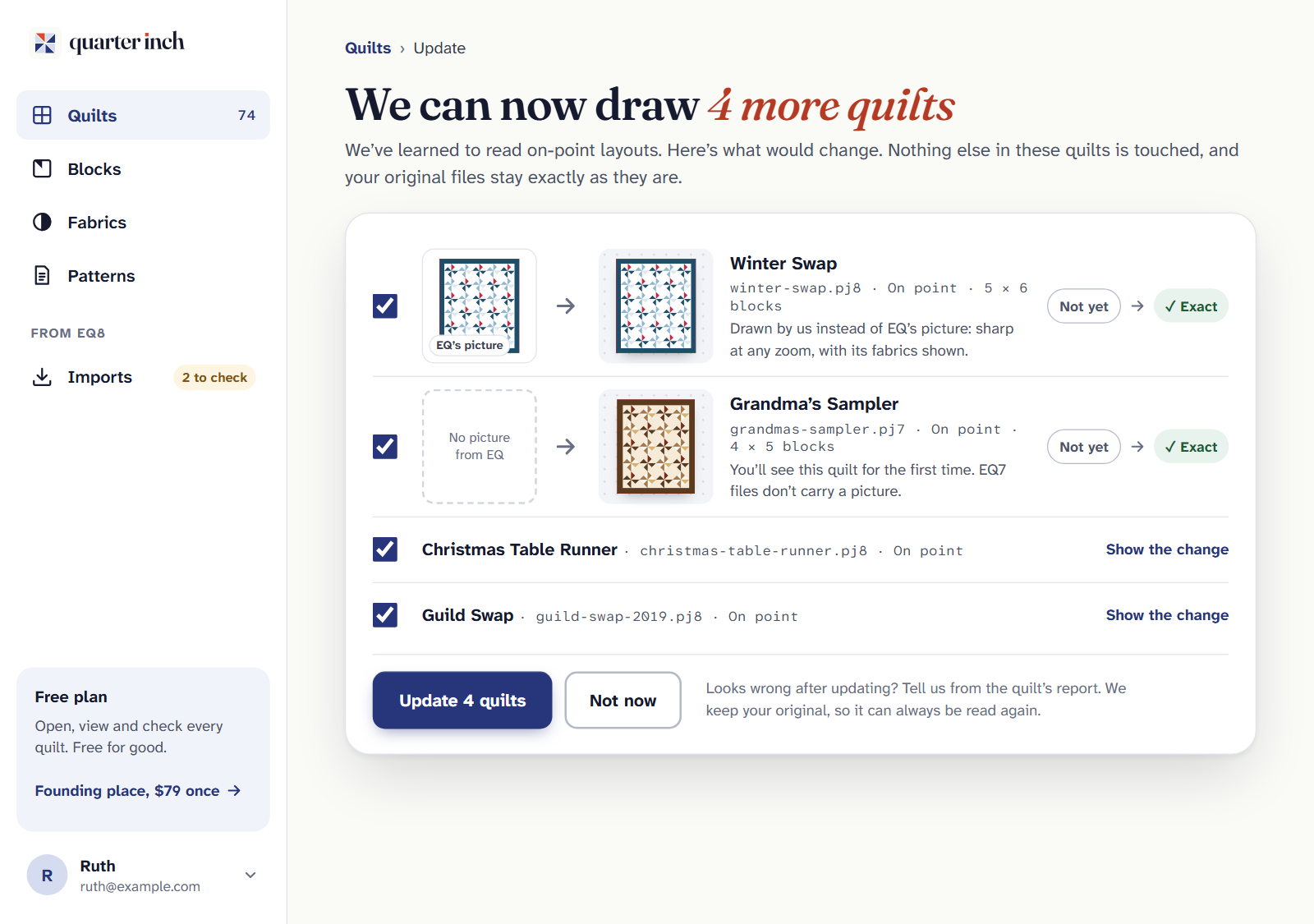
Before and after, side by side. Nothing changes until you choose. Untick any you’d rather leave as they are.
Choose the Update button. It counts the quilts you’ve ticked. Or choose Not now to go back with nothing changed.
Quilts you’ve changed since
A quilt you’ve changed in Quarter Inch is listed on its own, under Changed here since they came in. Your changes go back on top of the new reading.
Choose Review the update beside the quilt.
Compare Now with Updated, with your changes. The page lists your changes, and says if any can’t come across.
Choose Update and keep my changes, or Not now.
Why it needs your original file
Quarter Inch reads your file again from the copy it kept when you brought it across. If Keep a copy of my original files is off on your account page, there’s nothing to read again, so no update is offered.
Where else to look. Imports, in the sidebar, marks each file with an update waiting as Update ready, with Review beside it.
If it doesn’t look right
- It looks wrong after updating. Tell us from the quilt’s report. We keep your original, so it can always be read again.
- “Your quilts are up to date.” Nothing is waiting. Every quilt is read as well as our reader can read it.
- You want the old drawing back. A changed quilt keeps its earlier versions under History. See Undo, History and earlier versions.
Checked against the app on
Questions
Short answers.
Something else? A real person replies.
hello@quarterinch.app
Will an update change my quilt without asking?
No. Nothing changes until you choose. You see each change before and after, and can untick any quilt.
Will I lose changes I made to an EQ quilt?
No. Your changes go back on top of the new reading, and the page says if any can’t come across.
Does updating change my EQ file?
No. Your original EQ files stay exactly as they are.
Why don’t I get updates?
Updates read your file again from the copy Quarter Inch kept. With Keep a copy of my original files off, there’s nothing to read again.