Using Quarter Inch · Bringing quilts from EQ
Open EQ8 quilts with lettering, photos, embroidery, curves
EQ quilts can hold lettering, photos, embroidery and curves. Quarter Inch draws all four from what EQ saved. Here’s what you can change, and how each is cut.
The short answer
Quarter Inch draws lettering, photos, embroidery and curves from what EQ saved, with curves as true arcs where they can be. Lettering can be moved, resized and recolored but not retyped, and Embroidery is drawn stitch by stitch. Photos stay where EQ put them; choose Use a sharper copy… if one would print blurry.
Open a quilt from EQ and look under On this quilt, beside it. Lettering, photos and embroidery each have a row there: what it is, where it sits, and Show me where to point it out on the quilt.
Lettering
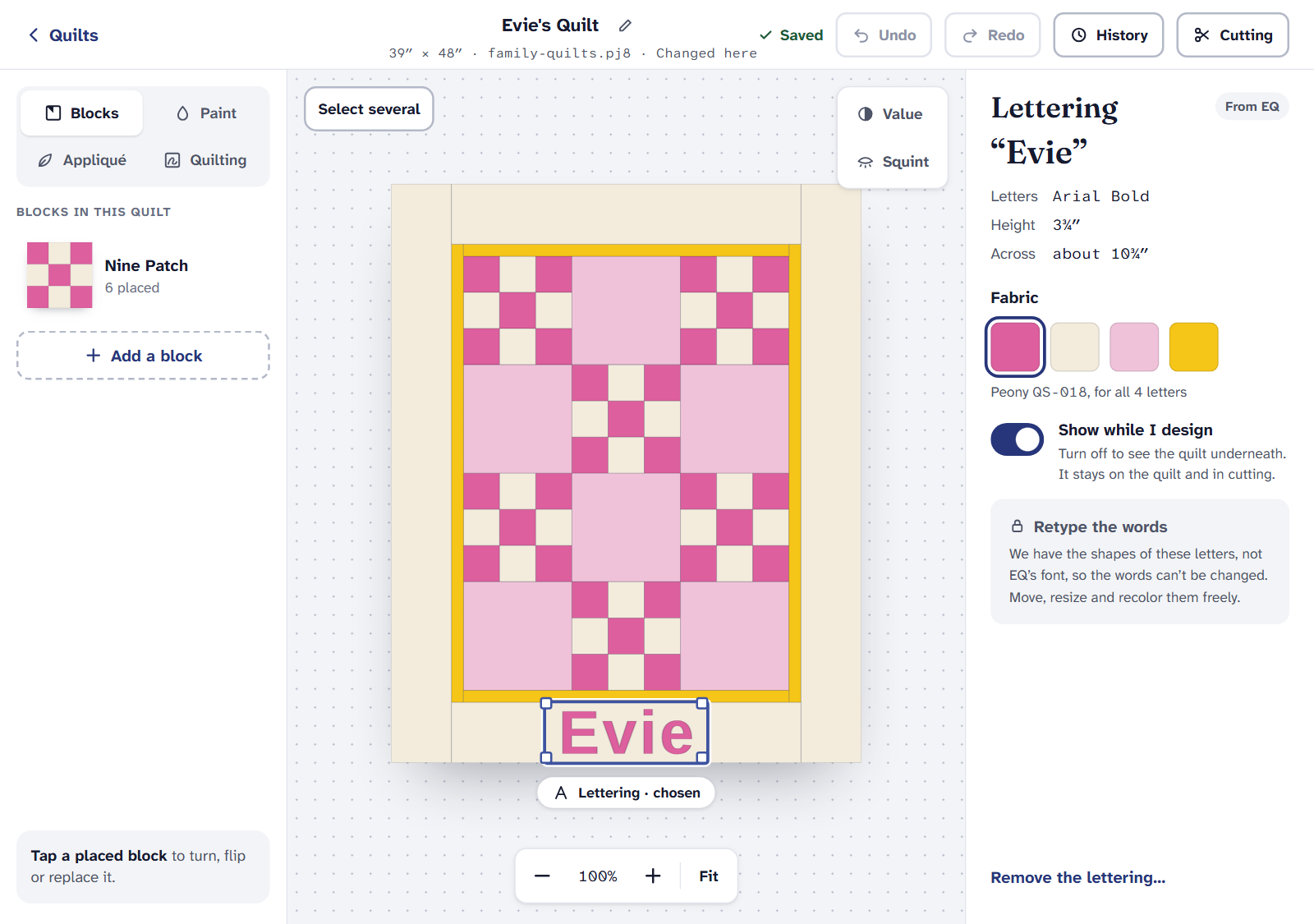
EQ saves lettering as the shapes of its letters, so we draw it exactly as you made it, even without EQ’s font on your computer. It’s treated as appliqué.
- In the designer, choose the lettering to move it, resize it from its corners (it keeps its shape), and change its Fabric. Turn off Show while I design to see the quilt underneath; it stays on the quilt and in cutting.
- You can’t retype the words. We have the letters’ shapes, not EQ’s font. To take the lettering off, choose Remove the lettering…. Undo puts it back, and your EQ file keeps it either way.
- Cutting: each letter gets its own template at true size. Choose Turned edge or Fusible: for fusible, the letters print reversed.
Photos
We draw each photo from the copy EQ saved, in the place and at the size EQ gave it.
- Photos stay where EQ put them, so the blocks around them still fit. You can’t move or resize one.
- A small copy prints blurry. If EQ kept only a small copy, the photo’s panel says so. Choose Use a sharper copy… and pick the photo from your computer: we fit it to the same size and keep it with this quilt, for you only. EQ’s copy stays in your original.
- Cutting: the Photos tab prints each photo on a fabric sheet at true size, with a ¼″ seam all around. Photos aren’t in the yardage: the plain squares under them are.
Embroidery
- We draw EQ’s embroidery stitch by stitch, in its thread colors, with its size and stitch count.
- We can’t make a file for your embroidery machine. Stitch from the design file you placed in EQ.
- Cutting: squares with embroidery can be cut 2″ larger, to fit your hoop and trim after stitching. The yardage follows.
Curved blocks
EQ saves curves as many short straight lines. Where those lines follow a circle closely, our reader turns them back into true arcs, so the block is drawn smooth and cut from exact templates.
- In the designer, tap a curved block and choose Edit a copy of its shape to change it in the block editor. EQ’s block stays as it was.
- Some curves can’t be drawn by the block editor yet. Then the menu says so: “Drawn with curves the block editor can’t draw yet.” The block still shows, colors and cuts as EQ made it.
For drawing your own curves, see Curved blocks with the Arc tool.
Seeing, moving and recoloring lettering, photos and embroidery is free. Their templates, photo sheets and cutting are part of Quilter, with the rest of the cutting chart.
If it doesn’t look right
- A photo says “Not in the file”. EQ placed it, but its picture was removed from EQ’s Sketchbook. We mark where it goes.
- The lettering is in the wrong fabric. Choose the lettering and pick another under Fabric.
- Something else is missing. The quilt’s Import report lists what’s Kept in your original.
Coming from EQ8? EQ8 lettering, photos and embroidery when you move covers the same from EQ8’s side.
Checked against the app on
Questions
Short answers.
Something else? A real person replies.
hello@quarterinch.app
Does EQ8 lettering come across to Quarter Inch?
Yes. It’s drawn from the letter shapes EQ saved, so it looks the same even without the font. You can move, resize and recolor it, not retype it.
Can I change the words?
No. We have the letters’ shapes, not EQ’s font. You can remove the lettering, and your EQ file keeps it either way.
Why will my photo print blurry?
EQ kept only a small copy. Choose Use a sharper copy… and pick the photo from your computer.
Can Quarter Inch make an embroidery machine file?
No. We draw EQ’s stitches, but stitch from the design file you placed in EQ.