Using Quarter Inch · Cutting and printing
Tape together a template printed on several pages
A template longer than a page prints in parts that overlap. Each join has two numbered marks: lay the parts so the marks meet, tape, then cut.
The short answer
A template longer than a page prints in parts that overlap, and you tape them into one. Print every part at Actual size and check the 1″ squares. Lay part 2 over part 1’s gray ½″ overlap until the circles 1A and 1B sit on top of each other, tape the join, then cut on the solid line.
Join the parts of a long template
A template bigger than the room on a page (7½″ × 7″ on Letter) prints in parts that overlap by ½″. In Window Seat, Template B (3½″ × 9⅝″ with seams) prints on 2 pages.
On the Templates tab, choose How the 2 pages join on the template’s card. You see each page, the template joined, and the steps. Switch Letter or A4 to see it on your paper.
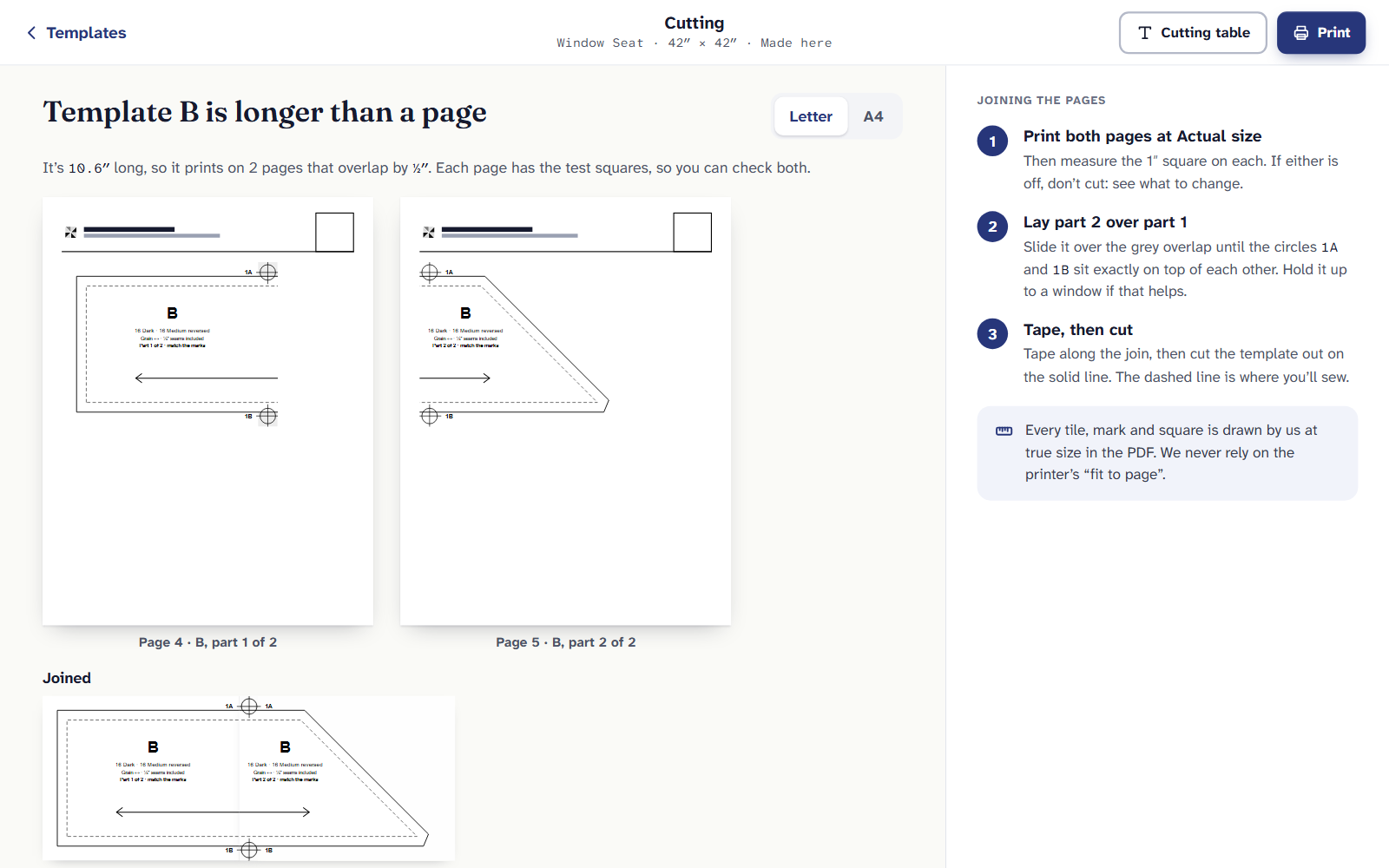
Window Seat’s Template B on Letter: two pages that overlap. Print both pages at Actual size. Measure the 1″ square on each. If either is off, don’t cut: see what to change.
Lay part 2 over part 1. Slide it over the gray overlap until the circles 1A and 1B sit exactly on top of each other. Hold it up to a window if that helps.
Tape, then cut. Tape along the join, then cut the template out on the solid line. The dashed line is where you’ll sew.
How the marks are numbered
Each join has a number and two marks: 1A and 1B on the first join, 2A and 2B on the second, and so on. A template that’s long and wide is split both ways; then the joins across each row are numbered first, then the joins down between rows. Join them in number order.
Every tile, mark and square is drawn at true size in the PDF. Nothing relies on the printer’s “fit to page”, which is why the pages must print at Actual size.
Printing templates comes with Quilter: $9 a month or $89 a year.
If it doesn’t look right
- The marks won’t line up. One page printed at a different size. Measure both squares, then reprint the one that’s off.
- The cutting line steps at the join. The parts are turned. Line up both marks, not one, before you tape.
- Printing on A4. The parts are a little different. Make the PDF on A4 and use that page’s view, not Letter’s.
Checked against the app on
Questions
Short answers.
Something else? A real person replies.
hello@quarterinch.app
How much do the pages overlap?
½″. The overlap is gray on the page, with two marks to match on each join.
Do I trim the margins first?
No. Lay one part over the other’s gray overlap, matching the marks, and tape. Then cut the template out on the solid line.
Why not shrink it to one page?
Then it wouldn’t be true size. Every template prints at its real size, across as many pages as it needs.