Using Quarter Inch · Bringing quilts from EQ
Save the fabric prints from your EQ8 files
The prints in your EQ8 and EQ7 files come with their swatches. Save them to My fabrics and you can use them in any quilt, long after the file is gone.
The short answer
Keep the printed fabrics from your EQ files, with their swatches, to use in any quilt. Choose Fabrics, then From EQ files, and choose Save beside a print, or save all of a file’s prints at once. Saved prints are in My fabrics.
Save prints from your EQ files
Choose Fabrics in the sidebar, then the From EQ files tab. It lists the fabrics in each of your EQ files, file by file.
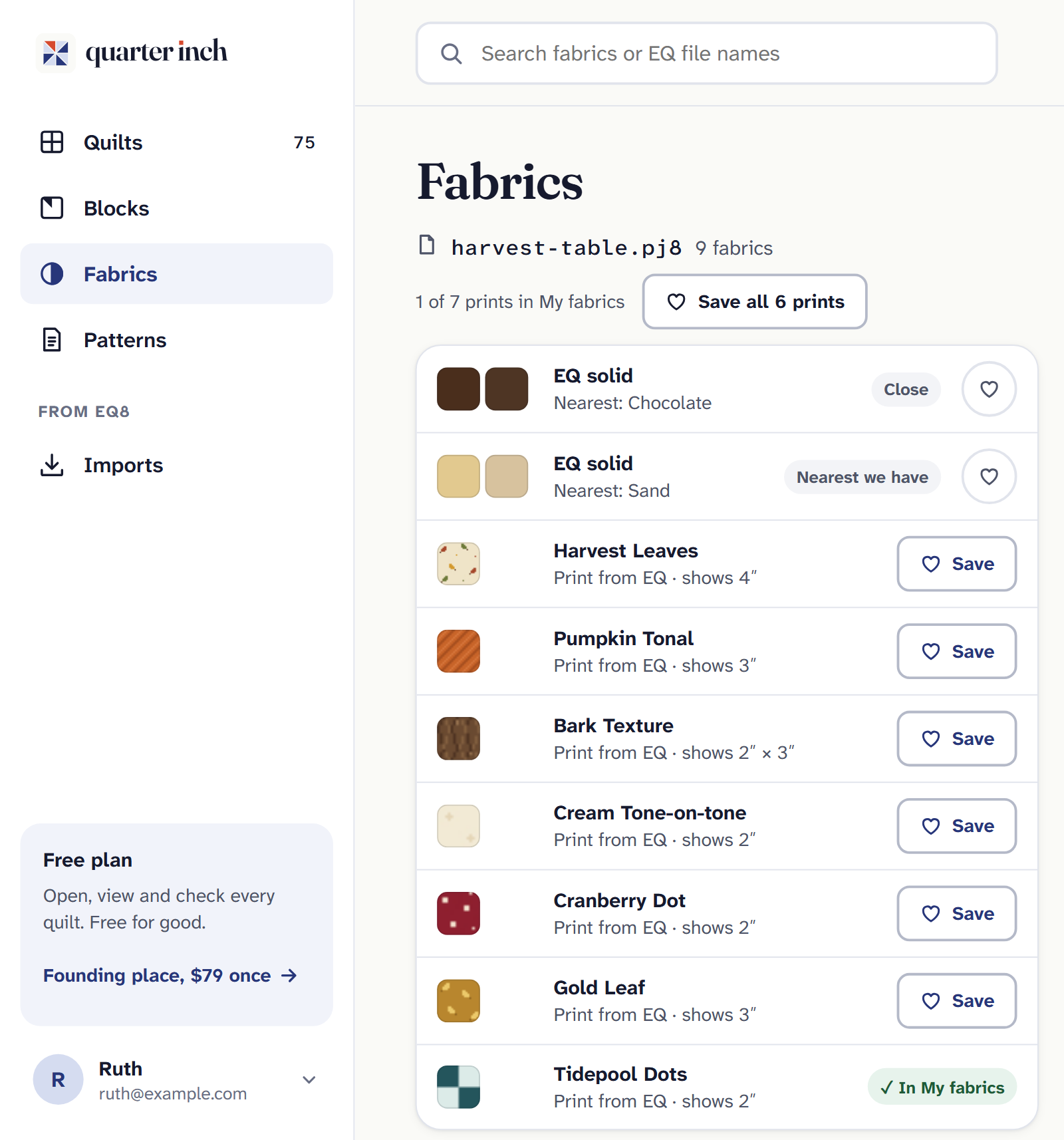
Each print keeps EQ’s swatch and name. Choose Save beside a print to keep that one. Or choose the button at the top of the file, such as “Save all 12 prints”, to keep every print in it you haven’t saved yet.
A saved print shows ✓ In My fabrics. Find them all under the My fabrics tab.
From a file’s Import report you can get there too: when a file has prints with EQ’s swatch, the report says so, with a link to save them. Nothing is saved until you ask.
Why save them
- Use them in any quilt. A saved print can be chosen for any quilt, made here or from EQ, and is drawn at the size EQ kept it.
- They outlive the file. A saved print is a copy. Delete the EQ file and the print stays in My fabrics.
- Saved once. A print used in several files is saved once, by its maker and number, or by its swatch.
- Private. Your saved prints are yours only: never shared or published.
What about EQ’s solids? EQ’s solid colors aren’t prints. They’re shown beside the nearest color on a color card. To keep one of those colors, choose it on the Color cards tab and choose Save to My fabrics.
If it doesn’t look right
- There’s no From EQ files tab. It shows only when you have an EQ file in your library. Files in Recently deleted don’t count.
- A print has no Save. It’s already in My fabrics: look for ✓ In My fabrics. Only prints with EQ’s swatch can be saved this way.
- You can’t find a print. Search by the fabric’s name or the EQ file’s name.
For photos of your own fabric and colors you mix, see Add your own fabrics.
Checked against the app on
Questions
Short answers.
Something else? A real person replies.
hello@quarterinch.app
Can I use my EQ8 fabrics in Quarter Inch?
Yes. Prints with EQ’s swatch can be saved to My fabrics from the From EQ files tab, then used in any quilt.
What happens to saved prints if I delete the EQ file?
They stay. A saved print is a copy that outlives the file.
Are my saved prints shared?
No. They’re private to you, never shared or published.