Using Quarter Inch · Cutting and printing
Read a quilt cutting chart: strips, subcuts and units
The cutting chart lists every cut, fabric by fabric: strips across the width of fabric, then what to cut from them. Tick each line as you go, on any device.
The short answer
The cutting chart lists every cut, fabric by fabric: each strip across the width of fabric, then the subcuts under it, lettered by piece. Choose Cutting chart on the quilt’s Cutting page. To cut geese or triangles another way, choose Change under How units are cut.
Read the chart
Open the quilt’s Cutting page and choose Cutting chart. Each fabric has a card, with how much to buy at the top.
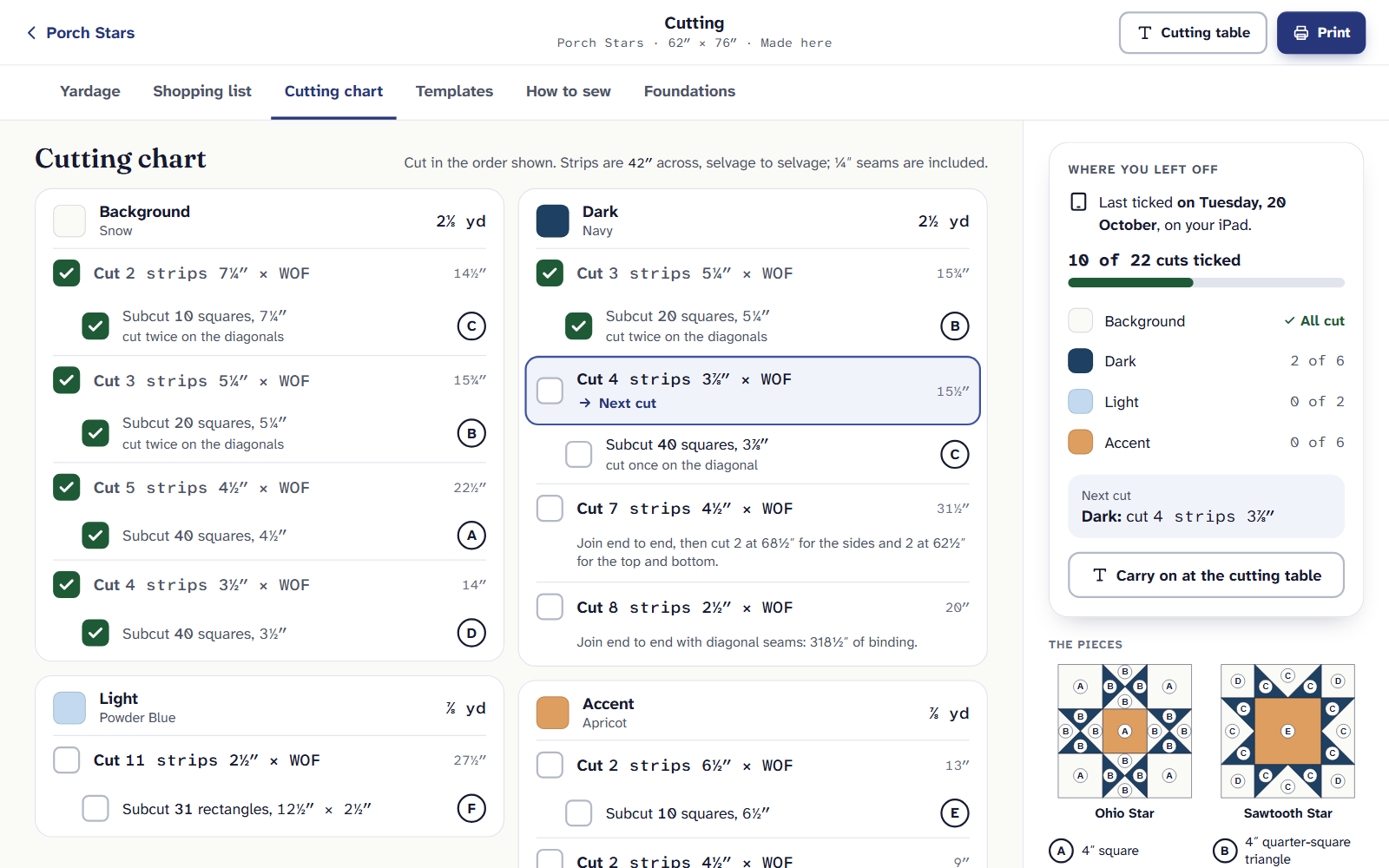
Porch Stars’ cutting chart. Strips first, then what to cut from them. Cut in the order shown. A line like “Cut 2 strips 7¼″ × WOF” is strips across the width of fabric, selvage to selvage, with the ¼″ seams already included.
Under each strip line is what to cut from those strips: “Subcut 10 squares, 7¼″”, then cut twice on the diagonals. The circled letter is the piece: find it in the key beside the chart and on the block diagrams.
Tick each line as you cut it. The count at the top, like “9 of 22 cuts ticked”, is saved with the quilt, so your iPad at the cutting mat agrees. The next one to cut is ringed and says Next cut.
Borders and binding are long strips: cut them, join them end to end, then cut the lengths the line gives. Starting again? Clear ticks asks first, and Undo puts them back.
Porch Stars has 22 lines to cut across 4 fabrics: 343 pieces in all. New to charts like this? How to read a cutting chart starts with the ruler.
How units are cut
Some units can be cut more than one way. Under How units are cut, choose Change. The choice is for the whole quilt, and the chart and the yardage change as you choose. Done closes it. For Porch Stars:
| Unit | Way to cut | Quilt top and binding |
|---|---|---|
| Flying geese (40) | Triangles, as drawn | 6⅜ yd |
| Flying geese (40) | No-waste, four at a time | 6⅜ yd |
| Flying geese (40) | Stitch and flip | 6¾ yd |
| Quarter-square triangles (160) | Squares cut twice, exact | 6⅜ yd |
| Quarter-square triangles (160) | A little large, then trim | 6⅜ yd |
- Triangles, as drawn: a big square cut twice for the geese, small squares cut once for the sky. Exact, nothing to trim.
- No-waste, four at a time: one big square and four small ones make four geese. Sew, then cut apart.
- Stitch and flip: a rectangle and two squares each. Easiest to sew; the corners you trim off are waste.
- Quarter-square triangles: Squares cut twice, exact (finished size plus 1¼″) or A little large, then trim (plus 1½″, trimmed after sewing). Half-square triangles have the same two choices: plus ⅞″, or plus 1″ and trim.
The sums behind these are in half-square triangles, quarter-square triangles and flying geese.
On the Free plan, Yardage and the Shopping list are yours, and the chart’s tab shows its first cut with the offer. Quilter is $9 a month or $89 a year.
If it doesn’t look right
- A line is amber with a note. The quilt changed after you ticked it, and the note says what to do, like “Cut 1 more strip.”
- A piece isn’t in the chart. Pieces a ruler can’t cut are on Templates, and blocks you foundation piece are cut large for their foundations.
- A number looks wrong. Choose A number looks wrong? beside the pieces. What to check, and how to tell us.
Checked against the app on
Questions
Short answers.
Something else? A real person replies.
hello@quarterinch.app
What does WOF mean?
Width of fabric: a strip cut across the fabric from selvage to selvage. The chart’s strips are cut that way.
Do the cut sizes include seam allowance?
Yes. Every size in the chart includes the ¼″ seams.
Can I tick cuts on my iPad and see them on my computer?
Yes. Ticks are saved with the quilt and show on every device.
Does changing how units are cut change the yardage?
Yes, at once. Each choice shows the quilt’s whole yardage beside it.