Using Quarter Inch · Cutting and printing
Print quilt templates at true size
A template is a piece a ruler’s marks can’t cut. Quarter Inch draws each one at its true size, with its seams, ready to print and cut around.
The short answer
For each piece a ruler’s marks can’t cut, Quarter Inch draws a template at true size, with its seams; everything else is in the cutting chart. On the quilt’s Cutting page, choose Templates, then Print templates. Print at Actual size, check the 1″ square, and cut on the solid line.
Print a quilt’s templates
Open the quilt’s Cutting page and choose Templates. The pill says how many pieces need one, or No templates when every piece is cut with the ruler.
Each template has a card: its letter, its block, its size with seams, and how many to cut of each fabric. In Window Seat, Template B is the sill of each Attic Windows block, 3½″ × 9⅝″ with seams: cut 16 Dark · 16 Medium reversed.
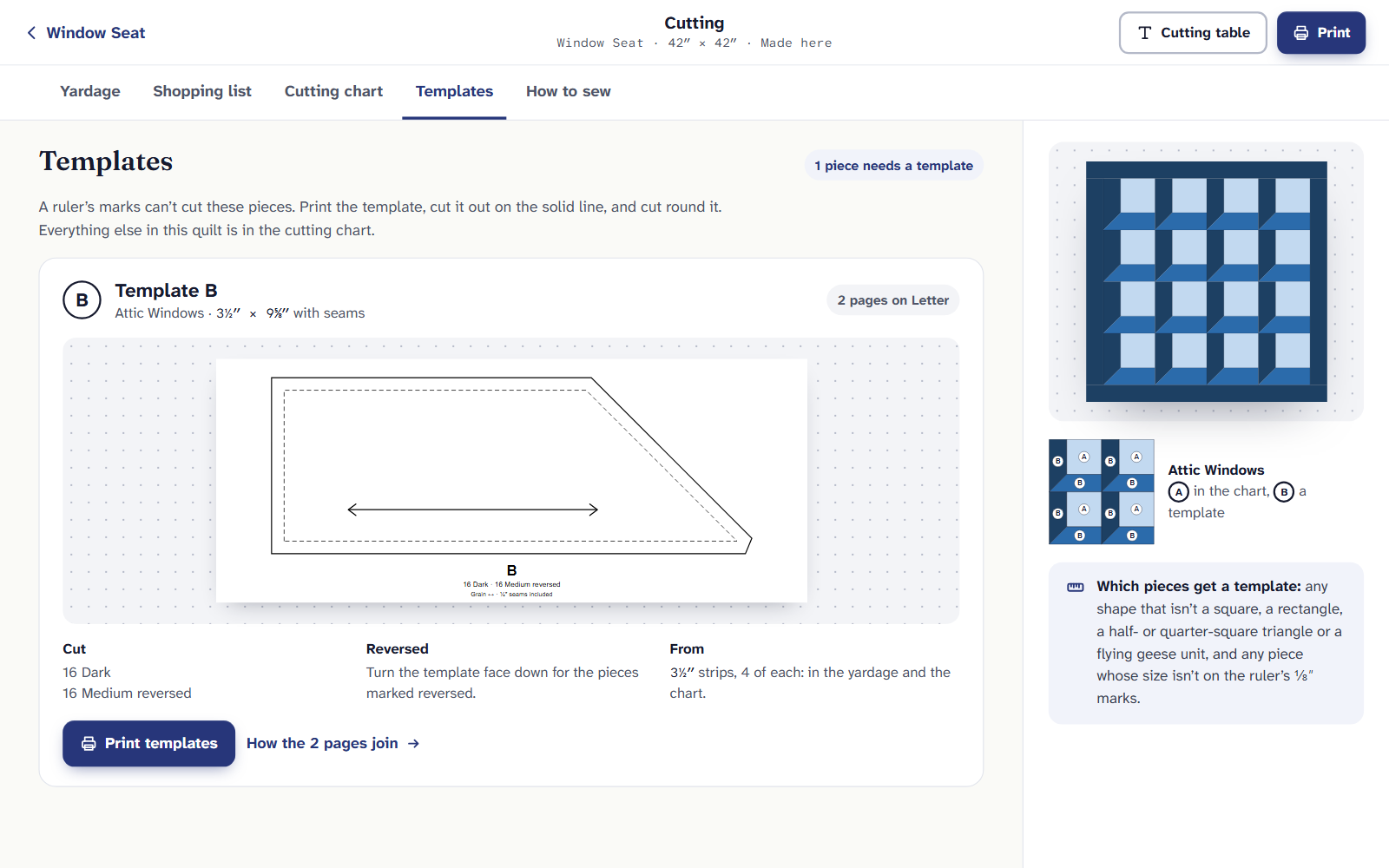
Window Seat’s one template. “Reversed” pieces are cut with the template face down. Choose Print templates. The Print dialog opens with only Templates ticked; add other parts if you like, then Make the PDF.
Print at Actual size and measure the 1″ square on each page. Cut the template out on the solid line. The dashed line inside it is where you’ll sew.
Lay the template on the fabric, cut around it, and turn it face down for the pieces marked reversed. The grain arrow lines up with the fabric’s straight grain.
Which pieces get a template
Any shape that isn’t a square, a rectangle, a half- or quarter-square triangle or a flying geese unit, and any piece whose size isn’t on the ruler’s ⅛″ marks. Quarter Inch never rounds a piece you sew: if a size isn’t on the ruler, it prints the piece at its true size instead.
Pieces off the ruler
Some blocks only cut cleanly at certain sizes. Star Crossing’s Ohio Stars are 10″, and the Templates tab says: “Ohio Star cuts cleanly at 9″ or 10½″. At 10″ its quarter-square triangles' long sides are 3⅓″, so they need templates.”
On a quilt made in Quarter Inch, a button like Make the blocks 10½″ changes the block size for you, as one change Undo takes back. Or keep the size and print the templates.
Templates longer than a page
A template bigger than the page prints in parts that overlap. Window Seat’s Template B takes 2 pages on Letter. Choose How the 2 pages join on its card to see them, then join the pages.
Planning a quilt with templates is free, and Yardage counts them. Printing them, and the Templates tab, come with Quilter: $9 a month or $89 a year.
If it doesn’t look right
- The template is a little small. The printer scaled the page. Check the 1″ square: the test square, and fixing it.
- No Print templates. The quilt has No templates: everything is in the cutting chart.
- Appliqué shapes aren’t here. They have their own tab: appliqué templates.
Checked against the app on
Questions
Short answers.
Something else? A real person replies.
hello@quarterinch.app
Do templates include the seam allowance?
Yes. Cut on the solid line; the dashed line inside is the sewing line, ¼″ in.
What does reversed mean?
Cut those pieces with the template turned face down, so they’re the mirror image.
Why does my quilt have no templates?
Every piece is a shape and size the ruler can cut, so it’s all in the cutting chart.