Using Quarter Inch · Pattern designer
Make a pattern from your quilt
Turn a quilt into a pattern to sell: your name and words on every page, up to five sizes, and every number worked out from the quilt itself.
The short answer
Turn any quilt into a pattern to sell, with your name and words and every size worked out exactly; pattern tools come with Quilter. Turn on Pattern designer in Account and settings, so Patterns shows in the menu. Then choose Make a pattern, pick a quilt, tick its sizes and choose Make the pattern.
Turn on Pattern designer
Patterns live in their own place in the menu, called Patterns, which shows once you say you’re a pattern designer. A new account doesn’t see it.
Choose your name in the sidebar, then Account and settings.
Turn on Pattern designer (“Show Patterns, where your quilts become patterns to sell.”). Patterns appears in the sidebar from the next page you open.
Under it, fill in Your designer details: your Studio name, Your logo, the contact line for the last page and your usual license. Every new pattern starts with these, and each pattern can change them.
No Quarter Inch name on your pages. Made with Quarter Inch is off unless you turn it on: “Off: no Quarter Inch name anywhere in your patterns.”
Make a pattern from a quilt
In Patterns, choose Make a pattern, then Choose a quilt. You can also open a quilt and choose Make a pattern beside Cutting chart and Print, or choose it from a quilt card’s menu in your library.
Under How to start, choose Set it up myself (the editor, with every tab empty but the numbers) or Make it with help.
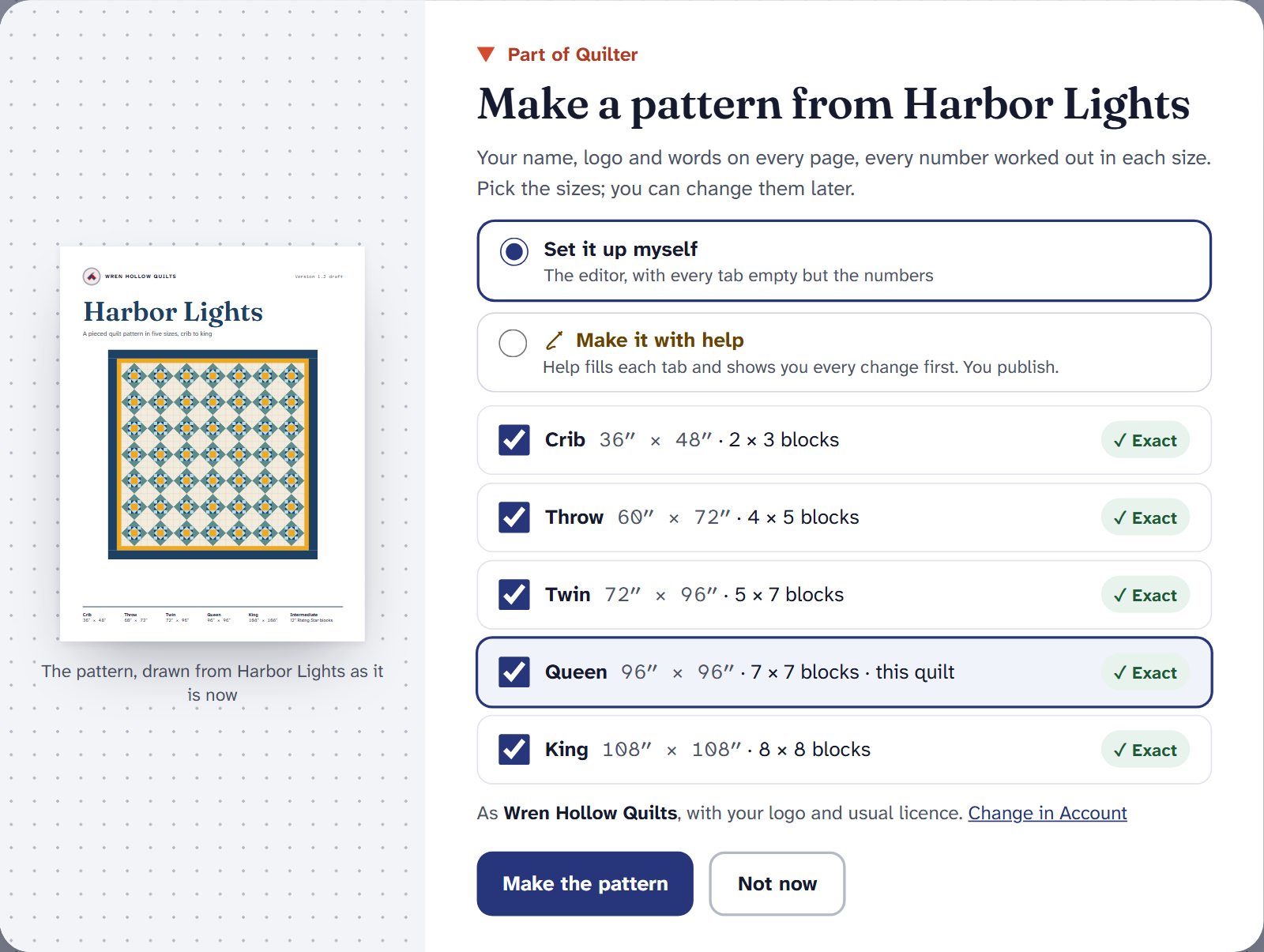
Make a pattern. The sizes listed are the ones the quilt can be made in exactly. Setting it up yourself: untick any sizes you don’t want. Each is the same quilt with whole blocks and the same borders, so it’s ✓ Exact. Then choose Make the pattern.
The pattern opens in its editor, with a page preview drawn as it will print, and seven tabs: Cover, Sizes, Fabric and supplies, Your words, Colourways, Pages and print and Versions. Every yardage, cut and sewing step in it is worked out by the same math as your cutting chart, in every size.
Not sure what you’ll get? On Patterns, See an example pattern opens a finished one to look through.
Make it with help
Help can fill in each tab for you, and shows you every change before it’s made.
Choose Make it with help. Say Who is it for?, which Sizes, and, if you’ve published patterns before, which one it should Sound like. Tick Suggest a second colourway or the drafts of your welcome and notes if you want them.
Choose See what Help will do. Help lists its plan. Choose Start, Change the plan, or Set it up myself after all.
Help works tab by tab: the sizes, fabric names and what to buy, notions, the colourway and your words. Each suggestion waits in a dashed gold card until you choose Use it; anything you change yourself is left as you have it.
What Help has done lists each change, each with Undo. Help stops at Versions: you check and publish.
Help never publishes, makes tester copies or exports, and never writes a number: numbers in its words are live, filled in by the pattern’s own math. How Help works says what it sees.
Making and changing patterns, tester copies, exporting for sale and Make it with help are part of Quilter, at no extra cost. On Free, Make a pattern opens the Quilter offer. If Quilter ends, your patterns stay: you can open them and print them for yourself.
If it doesn’t look right
- There’s no Patterns in the menu. Turn on Pattern designer in Account and settings. Once you have a pattern, Patterns stays.
- A quilt is under Not yet. A pattern can’t be made from those quilts yet, and each one says why. An empty quilt is one.
- Only one size is offered. Some quilts, such as medallions, can only be made at their own size, so the pattern is made at that size.
- Make it with help is grayed out. This month’s help is used, or Help isn’t available just now. Set it up yourself; everything else works.
Selling patterns? Quarter Inch for pattern designers has the whole picture.
Checked against the app on
Questions
Short answers.
Something else? A real person replies.
hello@quarterinch.app
Where are patterns in Quarter Inch?
Under Patterns in the menu, which shows once you turn on Pattern designer in Account and settings, or once you’ve made a pattern.
Does my pattern say Quarter Inch on it?
No. Your name and logo go on every page, and the Quarter Inch name appears only if you turn on Made with Quarter Inch.
Do I need a separate plan to sell patterns?
No. Pattern tools are part of Quilter at no extra cost, and there’s no fee on your sales: you sell where you already sell.
What happens to my patterns if I stop Quilter?
They stay. You can open and print them for yourself; making changes, tester copies and exporting for sale wait until Quilter again.